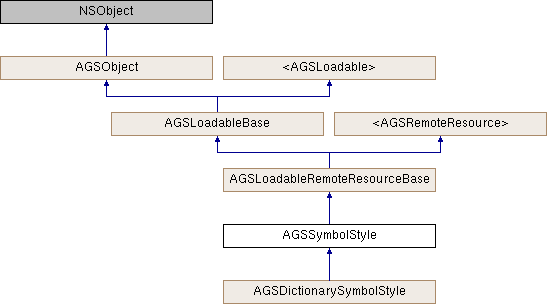
A symbol style object.
An AGSSymbolStyle is created from a style file on disk (an SQLite database with a .stylx extension, created with ArcGIS Pro).
When used by itself, the symbol style supports two key workflows. One is to return a symbol based on a provided set of key values. Since each symbol in the style has a key that uniquely identifies it, you can pass an array of keys into AGSSymbolStyle::symbolWithKeys:completion: to return a new AGSSymbol built from the individual symbols represented by those keys. You might use this symbol to create a new AGSGraphic.
The other common workflow is to use a standalone symbol style to search for symbol primitives. Symbol primitives are the individual symbols that compose more complex symbols. This is achieved using AGSSymbolStyle::searchSymbolsWithSearchParameters:completion:. You could create a symbol picker app, for example, that searches for all symbols in the style that have the tag "maritime" in it. The search results contain symbols that you could use directly. You could also extract their individual symbol components to create a new multilayer symbol.
- See also
AGSDictionarySymbolStyle
- Since
- 100
A convenience method to get properly initialized search parameters for looking up symbols within the .stylx file. The parameters contain all of the possible input values for categories, keys, names, symbolClasses, and tags. This is an expensive task that should be used sparingly. Returns a AGSSymbolStyleSearchParameters object providing all available search parameters from the database.
This asynchronous task retrieves all the valid input search parameters for a style. This means you get all of the possible input values for categories, keys, names, symbolClasses, and tags. This is an expensive task that should be used sparingly.
- Parameters
-
| completion | Block that is invoked when the operation finishes. The searchParams parameter is populated if the operation completed successfully, otherwise the error parameter is populated. |
- See also
- searchSymbolsWithParameters:completion:
- Since
- 100
| - (void) loadWithCompletion: |
|
(nullable void(^)(NSError *__nullable error)) |
completion |
|
|
requiredinherited |
Loads data for the object asynchronously. The completion block is invoked upon completion.
You can call this method any number of times, however only one attempt is made to load the data. If it is already loading, it will just continue to load (i.e. not force a reload). If it has already loaded successfully, the completion block will be invoked right away. If it has already failed to load, the completion block will be invoked right away with error previously encountered. This method supports multiple callers and will call them all back on completion. However, each caller's completion block will be invoked once and only once.
- Parameters
-
| completion | block that is invoked when object loads successfully or fails to load. An error is passed to the block if the object fails to load. |
- Note
- The completion block is always invoked on the main thread.
- Since
- 100
- See also
- cancelLoad to cancel loading -
- retryLoadWithCompletion: to force reload
| - (void) retryLoadWithCompletion: |
|
(nullable void(^)(NSError *__nullable error)) |
completion |
|
|
requiredinherited |
Tries to reload when an object has failed to load. This method should be called judiciously. It should be called when:
- you didn't have network connectivity earlier when it failed and you want to retry now that you have connectivity
- the server was down earlier when it failed and you want to retry
- the request is taking too long and you want to cancel it and retry, in which case you will first call
cancelLoad and then this method
If the data hasn't started loading, it will start loading. If it is already loading, it will just continue to load. If it has already loaded successfully, calls back right away. If it has already failed to load, tries again. This method supports multiple callers and will call them all back on completion. However, each caller's completion block will be invoked once and only once.
- Parameters
-
| completion | block that is invoked when object loads successfully or fails to load. An error is passed to the block if the object fails to load. |
- Note
- The completion block is always invoked on the main thread.
- Since
- 100
| - (id<AGSCancelable>) symbolForKeys: |
|
(NSArray< NSString * > *) |
keys |
| completion: |
|
(void(^)(AGSSymbol *__nullable symbol, NSError *__nullable error)) |
completion |
|
|
| |
Asynchronously returns a symbol based on the provided list of keys.
This function is useful for obtaining a single, multi-layer symbol from supplied keys. This is commonly used to create symbols and graphics on-the-fly. For example, assume XYZ style has a symbol with key "abc" which is the central symbol and another symbol with key "pqr", which could be the modifier/echelon placed at some offset from central geometry. So if you provide these two keys as attributes then symbol style will find and assemble a symbol accordingly. Once you have that symbol, you can apply it to a Graphic or Renderer, obtain its swatch image, or serialize to JSON. If the Symbol style is not loaded then starting this task will start the load cycle.
- Parameters
-
| keys | NSArray of strings. It is the list of keys required to obtain a symbol from the style. |
| completion | block that is invoked with the result |
- Since
- 100