Description
A dataset from an individual layer or table in ArcGIS Map or Feature service.
Instances of this class represent datasets in an individual layer or table of an ArcGIS Map or Feature service. The service may be hosted in the cloud on ArcGIS Online, or on-premises on an ArcGIS Server.
A service feature table has an AGSFeatureRequestMode, which controls, (1) whether features are cached locally (for quicker access by map and scene layers) and (2) whether queries are performed on the local cache or on the server. You can retrieve or modify a table's feature request mode using AGSFeatureRequestMode.
If the table's mode is AGSFeatureRequestModeOnInteractionCache, features are requested from the server in response to user or developer interaction (pan or zoom) and are cached locally. Queries are executed on the cache or (if requested features are not resident in the cache) on the server. This mode is the default.
If the table's mode is AGSFeatureRequestModeOnInteractionNoCache, features are always requested from the server. Features are not cached, and all queries are executed on the server.
If the table's mode is AGSFeatureRequestModeManualCache, you must call AGSServiceFeatureTable::populateFromServiceWithParameters:clearCache:outfields:completion:, which populates the local table with the features specified by AGSQueryParameters and containing the attributes specified by outfields parameter. Features are cached for the duration of the session and queries are executed against the cache.
If the table's feature request mode is AGSFeatureRequestModeOnInteractionCache or AGSFeatureRequestModeOnInteractionNoCache, ArcGISFeatures in the table initially contain a minimum set of attributes and goemetry that omits any m-values. This is an optimization for faster rendering. To access all attributes (and geometry with m-values) in features you get from a query, do one of the following: Call loadWithCompletion: (AGSLoadable-p) on each returned feature individually. Call the query method and pass the constant AGSQueryFeatureFieldsLoadAll, which performs the query and returns features fully loaded (with all attributes and any m-values defined by the service). See queryFeaturesWithParameters:queryFeatureFields:completion: (AGSServiceFeatureTable) and AGSServiceFeatureTable::queryRelatedFeaturesWithFeature:parameters:queryFeatureFields:completion:. Call loadOrRefreshFeatures:completion: (AGSServiceFeatureTable) and pass an array of AGSArcGISFeature to be loaded.
When used to create an AGSFeatureLayer in an AGSMapView, features are requested from the services in the correct spatial reference to match the spatial reference of the map.
You can use a service feature table to access non-spatial tables from feature services where AGSFeatureTable::hasGeometry is NO. The feature request mode of the table must be AGSFeatureRequestModeManualCache, and you must call AGSServiceFeatureTable::populateFromServiceWithParameters:clearCache:outfields:completion:.
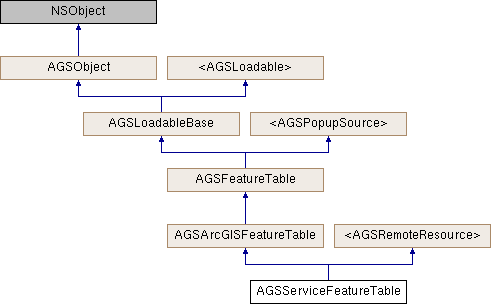
The parent class definition allows a service feature table to have editable attribute fields, feature templates, feature types, and editing capabilities defined in AGSArcGISFeatureLayerInfo::capabilities. See AGSFeatureTemplate and AGSFeatureType.
When using a Feature service, you can potentially create, delete, and update the data depending upon whether the service allows those operations, who owns the data, and what ownership-based access control policies are in place. Refer to the AGSFeatureTable::editable, canUpdateFeature: (AGSFeatureTable), canDeleteFeature: (AGSFeatureTable), for information on what's permitted.
Edits can be performed through AGSFeatureTable::addFeature:completion, addFeatures:completion: (AGSFeatureTable), deleteFeature:completion: (AGSFeatureTable), deleteFeatures:completion: (AGSFeatureTable), updateFeature:completion: (AGSFeatureTable), updateFeatures:completion: (AGSFeatureTable). However, these edits only affect the temporary geodatabase and must be committed to the service through applyEditsWithCompletion: (AGSServiceFeatureTable).
If the service supports attachments (AGSArcGISFeatureTable::hasAttachments), you can also view and potentially edit the attachments.
You can also query the data based on SQL expressions and/or spatial relationships.
This class is typically used in conjunction with AGSFeatureLayer to display feature data on a map. It can handle temporary network outages while still allowing you to work with the data that has already been retrieved from the service. Your edits are immediately peristed to the local geodatabase and can be applied to the service later when network connectivity is restored.
Service feature table adopts the loadable pattern; many of its properties are initialized asynchronously after connecting to the service. See AGSLoadable for more information.
A service feature table might require authentication to access the service.
- See also
AGSFeatureLayerto visualize features from this dataset on a map.
- Since
- 100
Class Methods | |
| (instancetype) | + serviceFeatureTableWithItem:layerID: |
| (instancetype) | + serviceFeatureTableWithTable:relationshipInfo: |
| (instancetype) | + serviceFeatureTableWithURL: |
Method Documentation
§ addedFeaturesCountWithCompletion:()
| - (id<AGSCancelable>) addedFeaturesCountWithCompletion: | (void(^)(NSInteger count, NSError *__nullable error)) | completion |
Number of features that have been locally added to the dataset, but not yet to the originating source.
- Parameters
-
completion block that is invoked when the operation finishes. The countparameter is populated if the operation completed successfully, otherwise theerrorparameter is populated.
- Returns
- operation which can be canceled
- Since
- 100
§ addedFeaturesWithCompletion:()
| - (id<AGSCancelable>) addedFeaturesWithCompletion: | (void(^)(AGSFeatureQueryResult *__nullable result, NSError *__nullable error)) | completion |
Set of features that have been locally added to the dataset, but not yet to the originating source.
- Parameters
-
completion block that is invoked when the operation finishes. The resultparameter is populated if the operation completed successfully, otherwise theerrorparameter is populated.
- Returns
- operation which can be canceled
- Since
- 100
§ cancelLoad()
|
requiredinherited |
Cancels loading if it is in progress, otherwise it does nothing. This should be called carefully because other objects could be waiting for loadWithCompletion: or retryLoadWithCompletion: to complete and this will call them all back with the error of NSUserCancelledError
- Since
- 100
§ canDeleteFeature:()
| - (BOOL) canDeleteFeature: | (AGSFeature *) | feature |
Indicates whether the source allows this particular feature to be deleted. The method first checks to verify if the source is capable of deleting any features in general. It also checks specific ownership-based access control policies of the source to see if the user attempting to perform the operation has persmissions to delete this particular feature.
- Parameters
-
feature Can be nil, in which case, this method only checks if the source is capable of deleting any features in general
- Returns
- A boolean value
- Since
- 100
§ canUpdateFeature:()
| - (BOOL) canUpdateFeature: | (AGSFeature *) | feature |
Indicates whether the source allows updating this particular feature. The method first checks to verify if the source is capable of updating any features in general. It also checks specific ownership-based access control policies of the source to see if the user attempting to perform the operation has persmissions to edit this patricular feature.
- Parameters
-
feature Can be nil, in which case, this method only checks if the source is capable of updating any features in general
- Returns
- A boolean value
- Since
- 100
§ clearCacheWithKeepLocalEdits:()
| - (void) clearCacheWithKeepLocalEdits: | (BOOL) | keepLocalEdits |
Clear all the data in the table, including any temporary edits.
- Since
- 100
§ createFeature()
| - (AGSFeature *) createFeature |
Create a new, empty feature. Note, the new feature is only available in memory at this point, it is not commited to the dataset.
- Returns
- emtpy feature
- Since
- 100
- Note
- The feature will need to be explicitly added to the dataset. See
addFeature:completion:
§ createFeatureWithAttributes:geometry:()
| - (AGSFeature *) createFeatureWithAttributes: | (NSDictionary< NSString *, id > *) | attributes | |
| geometry: | (nullable AGSGeometry *) | geometry | |
Create a new feature with the provided attribute values and, optionally, geometry. Note, the new feature is only available in memory at this point, it is not commited to the dataset.
- Parameters
-
attributes for the feature geometry for the feature
- Returns
- feature
- Since
- 100
- Note
- The feature will need to be explicitly added to the dataset. See
addFeature:completion:
§ createFeatureWithSubtype:()
| - (nullable AGSArcGISFeature *) createFeatureWithSubtype: | (AGSFeatureSubtype *) | featureSubtype |
Creates a new feature based on the specified feature subtype. Note, the new feature is only available in memory at this point, it is not commited to the dataset.
- Parameters
-
featureSubtype The subtype of feature to create.
- Returns
- The new feature.
- Note
- The feature will need to be explicitly added to the dataset. See
addFeature:completion: (AGSFeatureTable)
- Since
- 100.3
§ createFeatureWithSubtype:geometry:()
| - (nullable AGSArcGISFeature *) createFeatureWithSubtype: | (AGSFeatureSubtype *) | featureSubtype | |
| geometry: | (AGSGeometry *) | geometry | |
Creates a new feature based on the specified feature subtype and geoemtry. Note, the new feature is only available in memory at this point, it is not commited to the dataset.
- Parameters
-
featureSubtype The type of feature to create. geometry for the feature
- Returns
- The new feature.
- Note
- The feature will need to be explicitly added to the dataset. See
addFeature:completion: (AGSFeatureTable)
- Since
- 100.3
§ createFeatureWithTemplate:()
| - (nullable AGSArcGISFeature *) createFeatureWithTemplate: | (AGSFeatureTemplate *) | featureTemplate |
Creates a new feature based on the specified feature template. Note, the new feature is only available in memory at this point, it is not commited to the dataset.
- Parameters
-
featureTemplate The feature template to use while creating the feature.
- Returns
- The new feature.
- Note
- The feature will need to be explicitly added to the dataset. See
addFeature:completion: (AGSFeatureTable)
- Since
- 100
§ createFeatureWithTemplate:geometry:()
| - (nullable AGSArcGISFeature *) createFeatureWithTemplate: | (AGSFeatureTemplate *) | featureTemplate | |
| geometry: | (AGSGeometry *) | geometry | |
Creates a new feature based on the specified feature template and geometry. Note, the new feature is only available in memory at this point, it is not commited to the dataset.
- Parameters
-
featureTemplate The feature template to use while creating the feature. geometry for the feature
- Returns
- The new feature.
- Note
- The feature will need to be explicitly added to the dataset. See
addFeature:completion: (AGSFeatureTable)
- Since
- 100
§ createFeatureWithType:()
| - (nullable AGSArcGISFeature *) createFeatureWithType: | (AGSFeatureType *) | featureType |
Creates a new feature based on the specified feature type. Note, the new feature is only available in memory at this point, it is not commited to the dataset.
- Parameters
-
featureType The type of feature to create.
- Returns
- The new feature.
- Note
- The feature will need to be explicitly added to the dataset. See
addFeature:completion: (AGSFeatureTable)
- Since
- 100
§ createFeatureWithType:geometry:()
| - (nullable AGSArcGISFeature *) createFeatureWithType: | (AGSFeatureType *) | featureType | |
| geometry: | (AGSGeometry *) | geometry | |
Creates a new feature based on the specified feature type and geoemtry. Note, the new feature is only available in memory at this point, it is not commited to the dataset.
- Parameters
-
featureType The type of feature to create. geometry for the feature
- Returns
- The new feature.
- Note
- The feature will need to be explicitly added to the dataset. See
addFeature:completion: (AGSFeatureTable)
- Since
- 100
§ deletedFeaturesCountWithCompletion:()
| - (id<AGSCancelable>) deletedFeaturesCountWithCompletion: | (void(^)(NSInteger count, NSError *__nullable error)) | completion |
Number of features that have been locally deleted from the dataset, but not yet from the originating source.
- Parameters
-
completion block that is invoked when the operation finishes. The countparameter is populated if the operation completed successfully, otherwise theerrorparameter is populated.
- Returns
- operation which can be canceled
- Since
- 100
§ deletedFeaturesWithCompletion:()
| - (id<AGSCancelable>) deletedFeaturesWithCompletion: | (void(^)(AGSFeatureQueryResult *__nullable result, NSError *__nullable error)) | completion |
Set of features that have been locally deleted from the dataset, but not yet from the originating source.
- Parameters
-
completion block that is invoked when the operation finishes. The resultparameter is populated if the operation completed successfully, otherwise theerrorparameter is populated.
- Returns
- operation which can be canceled
- Since
- 100
§ featureTemplateForName:()
| - (nullable AGSFeatureTemplate *) featureTemplateForName: | (NSString *) | name |
Convenience method to retrieve a feature template given its name
- Parameters
-
name of feature template
- Returns
- feature template
- Since
- 100
§ featureTypeForName:()
| - (nullable AGSFeatureType *) featureTypeForName: | (NSString *) | name |
Convenience method to retrieve a feature type given its name
- Parameters
-
name of feature type
- Returns
- feature type
- Since
- 100
§ fieldForName:()
| - (nullable AGSField *) fieldForName: | (NSString *) | fieldName |
Convenience method to getting a field object given its name
- Parameters
-
fieldName The name of the field.
- Returns
- field
- Since
- 100
§ hasLocalEdits()
| - (BOOL) hasLocalEdits |
Checks whether the feature table has local edits.
For AGSServiceFeatureTable, local edits are edits that have not yet been applied to the feature service. For AGSGeodatabaseFeatureTable, local edits are edits that have been made since the last acknowledged upload.
- Returns
- Whether the table has local edits.
- Since
- 100.9
§ initWithItem:layerID:()
| - (instancetype) initWithItem: | (AGSItem *) | item | |
| layerID: | (NSInteger) | layerID | |
Initialize the layer with the provided information
- Parameters
-
item representing an ArcGIS Feature Serivce. The item's type must be AGSPortalItemTypeFeatureService.layerID ID of an individual layer in the ArcGIS Feature service represented by the item
- Returns
- Initialized layer
- Since
- 100
§ initWithTable:relationshipInfo:()
| - (instancetype) initWithTable: | (AGSServiceFeatureTable *) | table | |
| relationshipInfo: | (AGSRelationshipInfo *) | relationshipInfo | |
Convenience method to initialize this table to be the one that participates in the specified relationship with the provided table
- Parameters
-
table that this table is related to through the specified relationship relationshipInfo specifying the relationship that this table participates in with the provided table
- Since
- 100.1
§ initWithURL:()
| - (instancetype) initWithURL: | (NSURL *) | url |
Initialize the table with the given URL
- Parameters
-
url The URL of an individual layer or table in ArcGIS Map or Feature service whose data needs to be accessed or edited
- Since
- 100
§ loadOrRefreshFeatures:completion:()
| - (id<AGSCancelable>) loadOrRefreshFeatures: | (NSArray< AGSArcGISFeature * > *) | features | |
| completion: | (nullable void(^)(NSError *__nullable error)) | completion | |
Loads all attributes and geometries for unloaded features, and refetches attributes and geometries for previously loaded features. All features loaded or refreshed by this method will have m-values if defined by the service. Note that an m-value might be NaN. Features you get from queryFeaturesWithParameters:queryFeatureFields:completion: or queryRelatedFeaturesForFeature:parameters:queryFeatureFields:completion: might be in the minimally loaded state (minimum attributes required for rendering and no m-values). To load all attributes, pass a mutable array of the features to this method. Any feature requested, but not returned, by the server will have its object id cleared (set to an invalid negative value) to indicate it is no longer associated with the service feature table. After calling this method, any non-applied edits on the table will be lost. This method will not refresh feature attachments. Use fetchAttachmentsWithCompletion: (AGSArcGISFeature) to retrieve attachments.
- Parameters
-
features that need to be loaded or refreshed. When the operation completes, the attributes and geometry of these features is updated. completion block that is invoked when the operation finishes. The errorparameter is populated if the operation encounters an error.
- Since
- 100.3
§ loadWithCompletion:()
|
requiredinherited |
Loads data for the object asynchronously. The completion block is invoked upon completion.
You can call this method any number of times, however only one attempt is made to load the data. If it is already loading, it will just continue to load (i.e. not force a reload). If it has already loaded successfully, the completion block will be invoked right away. If it has already failed to load, the completion block will be invoked right away with error previously encountered. This method supports multiple callers and will call them all back on completion. However, each caller's completion block will be invoked once and only once.
- Parameters
-
completion block that is invoked when object loads successfully or fails to load. An error is passed to the block if the object fails to load.
- Note
- The completion block is always invoked on the main thread.
- Since
- 100
- See also
- cancelLoadto cancel loading-
- retryLoadWithCompletion:to force reload
§ populateFromServiceWithParameters:clearCache:outFields:completion:()
| - (id<AGSCancelable>) populateFromServiceWithParameters: | (AGSQueryParameters *) | parameters | |
| clearCache: | (BOOL) | clearCache | |
| outFields: | (NSArray< NSString * > *) | outFields | |
| completion: | (nullable void(^)(AGSFeatureQueryResult *__nullable result, NSError *__nullable error)) | completion | |
Queries the feature service and places the resulting features in the local table, which is cached for the duration of the session. The AGSServiceFeatureTable must have its AGSServiceFeatureTable::featureRequestMode set to AGSFeatureRequestModeManualCache. This method is useful for non-geographic data. It's also helpful when you want to avoid accessing the service for a feature whose geometry is in the current extent of the AGSMap or AGSScene. Specifying nil or an empty NSArray for outfields results in the minimum set of fields being used when populating the local table. This is the same set of attributes described for AGSFeatureRequestModeOnInteractionCache or AGSFeatureRequestModeOnInteractionNoCache.
- Parameters
-
parameters defining which data should be requsted from the service and added to the table clearCache If YES, thenclearCacheWithKeepLocalEdits:will be called before populating the local table. IfNO, the resulting features will be appended to the local table.outFields An array of strings. Each string is the name of a field to be used when populating the cache. If the array contains the single string "*", then all fields will be used.completion Block that is invoked when the operation finishes. The resultparameter is populated if the operation completed successfully, otherwise theerrorparameter is populated.
- Returns
- An operation which can be canceled.
- Since
- 100
§ queryExtentWithParameters:completion:()
| - (id<AGSCancelable>) queryExtentWithParameters: | (AGSQueryParameters *) | parameters | |
| completion: | (void(^)(AGSEnvelope *__nullable extent, NSError *__nullable error)) | completion | |
Query the dataset to find the geographic extent covering matched features or records.
- Parameters
-
parameters representing the query criteria completion The block that is called when the query is complete
- Returns
- operation which can be canceled
- Since
- 100.2
§ queryFeatureCountWithParameters:completion:()
| - (id<AGSCancelable>) queryFeatureCountWithParameters: | (AGSQueryParameters *) | parameters | |
| completion: | (void(^)(NSInteger count, NSError *__nullable error)) | completion | |
Query the dataset to find the number of matched features or records.
- Parameters
-
parameters representing the query criteria completion The block that is called when the query is complete
- Returns
- operation which can be canceled
- Since
- 100.2
§ queryFeaturesWithParameters:completion:()
| - (id<AGSCancelable>) queryFeaturesWithParameters: | (AGSQueryParameters *) | parameters | |
| completion: | (nullable void(^)(AGSFeatureQueryResult *__nullable result, NSError *__nullable error)) | completion | |
Query the dataset to find specific features or records.
- Parameters
-
parameters representing the query criteria completion The block that is called when the query is complete
- Returns
- operation which can be canceled
- Since
- 100
§ queryFeaturesWithParameters:queryFeatureFields:completion:()
| - (id<AGSCancelable>) queryFeaturesWithParameters: | (AGSQueryParameters *) | parameters | |
| queryFeatureFields: | (AGSQueryFeatureFields) | queryFeatureFields | |
| completion: | (nullable void(^)(AGSFeatureQueryResult *__nullable result, NSError *__nullable error)) | completion | |
Queries features from this table's cache and/or from the feature service used to create this table. If the request mode of the table is AGSFeatureRequestModeManualCache, then the query is always performed on the local table. If the mode is AGSFeatureRequestModeOnInteractionCache, then the query is performed on the local cache, provided that the geometries of the features are within an extent that has been cached; otherwise, the query is performed on the server. If the mode is AGSFeatureRequestModeOnInteractionNoCache, the query is always performed on the server. The AGSQueryFeatureFields constants control which fields will be included with the returned features. A table whose feature request mode is AGSFeatureRequestModeManualCache, contains all fields that you specified when calling AGSServiceFeatureTable::populateFromServiceWithParameters:clearCache:outfields:completion:. A table whose feature request mode is AGSFeatureRequestModeOnInteractionCache or AGSFeatureRequestModeOnInteractionNoCache, initially contains features with a minimum set of attribute required for rendering. You must load a feature to access all its attributes. The convenience constant AGSQueryFeatureFieldsLoadAll automatically loads the returned features into the local table, which makes all attributes available. Note that you can query on any attribute defined by the feature service's table. If the attribute is not in the minimum set of attributes in your local table, the query will be performed on the server.
- Parameters
-
parameters Options for controlling the operation. queryFeatureFields Options for controlling what fields are in the features of the query result. completion Block that is invoked when the operation finishes. The resultparameter is populated if the operation completed successfully, otherwise theerrorparameter is populated.
- Returns
- An operation which can be canceled.
- Since
- 100.1
§ queryRelatedFeatureCountForFeature:completion:()
| - (id<AGSCancelable>) queryRelatedFeatureCountForFeature: | (AGSArcGISFeature *) | feature | |
| completion: | (void(^)(NSInteger count, NSError *__nullable error)) | completion | |
§ queryRelatedFeatureCountForFeature:parameters:completion:()
| - (id<AGSCancelable>) queryRelatedFeatureCountForFeature: | (AGSArcGISFeature *) | feature | |
| parameters: | (AGSRelatedQueryParameters *) | parameters | |
| completion: | (void(^)(NSInteger count, NSError *__nullable error)) | completion | |
§ queryRelatedFeaturesForFeature:completion:()
| - (id<AGSCancelable>) queryRelatedFeaturesForFeature: | (AGSArcGISFeature *) | feature | |
| completion: | (void(^)(NSArray< AGSRelatedFeatureQueryResult * > *__nullable results, NSError *__nullable error)) | completion | |
Returns all features (spatial or non-spatial) that are related to the specified feature. The related features must belong to a feature table that is related to this feature table. Also, the related tables must be part of either the map's operational layers collection (AGSMap::operationalLayers) through a feature layer if they are spatial, or the map's tables collection (AGSMap::tables) directly if they are non-spatial.
- Parameters
-
feature for which to find related features (spatial and non-spatial) completion block that is invoked when the operation finishes. The resultsparameter is populated if the operation completed successfully, otherwise theerrorparameter is populated.
- Returns
- operation which can be canceled
- Since
- 100.1
§ queryRelatedFeaturesForFeature:parameters:completion:()
| - (id<AGSCancelable>) queryRelatedFeaturesForFeature: | (AGSArcGISFeature *) | feature | |
| parameters: | (AGSRelatedQueryParameters *) | parameters | |
| completion: | (void(^)(NSArray< AGSRelatedFeatureQueryResult * > *__nullable results, NSError *__nullable error)) | completion | |
Returns features (spatial or non-spatial) that are related to the specified feature based on the provided parameters. The related features must belong to a feature table that is related to this feature table. Also, the related tables must be part of either the map's operational layers collection (AGSMap::operationalLayers) through a feature layer if they are spatial, or the map's tables collection (AGSMap::tables) directly if they are non-spatial.
- Parameters
-
feature for which to find related features (spatial and non-spatial) parameters specifying which related features to query completion block that is invoked when the operation finishes. The resultsparameter is populated if the operation completed successfully, otherwise theerrorparameter is populated.
- Returns
- operation which can be canceled
- Since
- 100.1
§ queryRelatedFeaturesForFeature:parameters:queryFeatureFields:completion:()
| - (id<AGSCancelable>) queryRelatedFeaturesForFeature: | (AGSArcGISFeature *) | feature | |
| parameters: | (AGSRelatedQueryParameters *) | parameters | |
| queryFeatureFields: | (AGSQueryFeatureFields) | queryFeatureFields | |
| completion: | (void(^)(NSArray< AGSRelatedFeatureQueryResult * > *__nullable result, NSError *__nullable error)) | completion | |
Returns features (spatial or non-spatial) that are related to the specified feature based on the provided parameters. The related features must belong to a feature table that is related to this feature table. Also, the related tables must be part of either the map's operational layers collection (AGSMap::operationalLayers) through a feature layer if they are spatial, or the map's tables collection (AGSMap::tables) directly if they are non-spatial.
- Parameters
-
feature for which to find related features (spatial and non-spatial) parameters specifying which related features to query queryFeatureFields specifying which attribute fields should be included in the result completion block that is invoked when the operation finishes. The resultparameter is populated if the operation completed successfully, otherwise theerrorparameter is populated.
- Returns
- operation which can be canceled
- Since
- 100.1
§ queryStatisticsWithParameters:completion:()
| - (id<AGSCancelable>) queryStatisticsWithParameters: | (AGSStatisticsQueryParameters *) | parameters | |
| completion: | (void(^)(AGSStatisticsQueryResult *__nullable result, NSError *__nullable error)) | completion | |
Query the dataset to compute statistics on matched features or records.
- Parameters
-
parameters representing the query criteria completion The block that is called when the query is complete
- Returns
- operation which can be canceled
- Since
- 100.2
§ relatedTables()
| - (nullable NSArray<AGSArcGISFeatureTable*> *) relatedTables |
All feature tables (spatial or non-spatial) that are related to this feature table. The related tables must be part of either the map's operational layers collection (AGSMap::operationalLayers) through a feature layer if they are spatial, or the map's tables collection (AGSMap::tables) directly if they are non-spatial.
- Since
- 100.1
§ relatedTablesWithRelationshipInfo:()
| - (nullable NSArray<AGSArcGISFeatureTable*> *) relatedTablesWithRelationshipInfo: | (AGSRelationshipInfo *) | relationshipInfo |
The feature tables (spatial or non-spatial) that are related to this feature table through the specified relationship. The related feature tables must be a part of either the map's operational layers collection (AGSMap::operationalLayers) through a feature layer if they are spatial, or the map's tables collection (AGSMap::tables) directly if they are non-spatial.
- Parameters
-
relationshipInfo specifying the relationship based on which results should be returned
- Returns
- feature tables that are related to this table through the specified relationship
- Since
- 100.1
§ retryLoadWithCompletion:()
|
requiredinherited |
Tries to reload when an object has failed to load. This method should be called judiciously. It should be called when:
- you didn't have network connectivity earlier when it failed and you want to retry now that you have connectivity
- the server was down earlier when it failed and you want to retry
- the request is taking too long and you want to cancel it and retry, in which case you will first call
cancelLoadand then this method
If the data hasn't started loading, it will start loading. If it is already loading, it will just continue to load. If it has already loaded successfully, calls back right away. If it has already failed to load, tries again. This method supports multiple callers and will call them all back on completion. However, each caller's completion block will be invoked once and only once.
- Parameters
-
completion block that is invoked when object loads successfully or fails to load. An error is passed to the block if the object fails to load.
- Note
- The completion block is always invoked on the main thread.
- Since
- 100
§ serviceFeatureTableWithItem:layerID:()
| + (instancetype) serviceFeatureTableWithItem: | (AGSItem *) | item | |
| layerID: | (NSInteger) | layerID | |
Initialize the layer with the provided information
- Parameters
-
item representing an ArcGIS Feature Serivce. The item's type must be AGSPortalItemTypeFeatureService.layerID ID of an individual layer in the ArcGIS Feature service represented by the item
- Returns
- Initialized layer
- Since
- 100
§ serviceFeatureTableWithTable:relationshipInfo:()
| + (instancetype) serviceFeatureTableWithTable: | (AGSServiceFeatureTable *) | table | |
| relationshipInfo: | (AGSRelationshipInfo *) | relationshipInfo | |
Convenience method to initialize this table to be the one that participates in the specified relationship with the provided table
- Parameters
-
table that this table is related to through the specified relationship relationshipInfo specifying the relationship that this table participates in with the provided table
- Since
- 100.1
§ serviceFeatureTableWithURL:()
| + (instancetype) serviceFeatureTableWithURL: | (NSURL *) | URL |
Initialize the table with the given URL
- Parameters
-
URL The URL of an individual layer or table in ArcGIS Map or Feature service whose data needs to be accessed or edited
- Since
- 100
§ undoLocalEditsWithCompletion:()
| - (id<AGSCancelable>) undoLocalEditsWithCompletion: | (nullable void(^)(NSError *__nullable error)) | completion |
Undoes any local edits to features and attachments since the last time edits were succesfully applied to the server. You can use addedFeaturesWithCompletion: (AGSArcGISFeatureTable), deletedFeaturesWithCompletion: (AGSArcGISFeatureTable), and updatedFeaturesWithCompletion: (AGSArcGISFeatureTable) to find out which features have local edits that will be reverted. If you are holding on to an instance of a feature whose local edit is reverted, you will need to discard that instance and retrieve a new instance by querying the table.
- Parameters
-
completion block that is invoked when the operation finishes. The errorparameter is populated if the operation encounters an error.
- Since
- 100.3
§ updatedFeaturesCountWithCompletion:()
| - (id<AGSCancelable>) updatedFeaturesCountWithCompletion: | (void(^)(NSInteger count, NSError *__nullable error)) | completion |
Number of features that have been locally updated in the dataset, but not yet in the originating source.
- Parameters
-
completion block that is invoked when the operation finishes. The countparameter is populated if the operation completed successfully, otherwise theerrorparameter is populated.
- Returns
- operation which can be canceled
- Since
- 100
§ updatedFeaturesWithCompletion:()
| - (id<AGSCancelable>) updatedFeaturesWithCompletion: | (void(^)(AGSFeatureQueryResult *__nullable result, NSError *__nullable error)) | completion |
Set of features that have been locally updated in the dataset, but not yet in the originating source.
- Parameters
-
completion block that is invoked when the operation finishes. The resultparameter is populated if the operation completed successfully, otherwise theerrorparameter is populated.
- Returns
- operation which can be canceled
- Since
- 100
§ validateRelationshipConstraintsForFeature:completion:()
| - (id<AGSCancelable>) validateRelationshipConstraintsForFeature: | (AGSArcGISFeature *) | feature | |
| completion: | (void(^)(AGSRelationshipConstraintViolationType relationshipConstraintViolationType, NSError *__nullable error)) | completion | |
Checks to see if performing edit operations (addFeature:completion: (AGSFeatureTable) or updateFeature:completion: (AGSFeatureTable)) with the provided feature could lead to a relationship constraint violation. This method makes network calls to query for the related features if they are not present locally
- Note
- Edit operations such as
addFeature:completion: (AGSFeatureTable),updateFeature:completion: (AGSFeatureTable)do not error due to relationship constraint violations. Rather, it is the responsibility of the developer to use this method to explicitly check for violations after the edit is performed. Alternatively, you can recover from violations in a back office operation after applying edits or syncing with the service, if you choose to do so. See ArcGIS Desktop Validate Features process.
The following are types of violations that may be reported: AGSRelationshipConstraintViolationTypeOrphaned : In a composite relationship, adding an orphan feature to the destination table without relating it to an origin feature. To recover from this violation, relate the feature to a valid origin feature. AGSRelationshipConstraintViolationTypeCardinality - cardinality violations: In 1:1 relationships, if an origin feature is already related to a destination feature, it is a violation to relate another feature to either of them. To recover from this violation, unrelate the feature from the origin feature. In 1:n relationships, it is a violation to relate a destination feature to more than one origin feature. To recover from this violation, unrelate the feature from the origin feature.
- Parameters
-
feature for which relationship constraints need to be validated. completion block that is invoked when the operation finishes. The relationshipConstraintViolationTypeparameter is populated if the operation completed successfully, otherwise theerrorparameter is populated.
- Returns
- operation which can be canceled
- Since
- 100.1
- See also
- relateToFeature: (AGSArcGISFeature)to relate two features-
- unrelateToFeature: (AGSArcGISFeature)to unrelate two features
Property Documentation
§ bufferFactor
|
readwritenonatomicassign |
This factor determines the size of the buffer around the map's current extent for which data is retrieved from the service. Data is not retrieved again until either it expires or the map extent changes and is no longer in the buffered extent. Buffer factor can be up to 10. If it is set to 0 or 1, every time the map extent is changed data for that extent will be requested from the service. Default value is 2
- Since
- 100
- Note
- Only applies to
AGSFeatureRequestModeOnInteractionCache
§ canAddFeature
|
readnonatomicassigninherited |
Indicates whether the source supports adding new features.
- Since
- 100
§ canEditGeometry
|
readnonatomicassigninherited |
Indicates whether the source supports updating geometry of existing features.
- Since
- 100
§ credential
|
readwritenonatomicstronginherited |
Security credentials to access the remote resource. Only applicable if the resource is secured.
- Since
- 100
§ defaultSubtypeCode
|
readnonatomiccopyinherited |
The code for the default feature subtype. This value is for the field specified in subtypeField
- See also
#featureSubTypesfor the list of feature subtypes available
- Since
- 100.3
§ definitionExpression
|
readwritenonatomiccopy |
An expression which is a SQL statement where clause to filter out the features to be queried. The definition expression string uses the SQL-92 where clause syntax (https://en.wikipedia.org/wiki/SQL-92). Be sure to escape special characters in the expression string as required for your platform. The DATE keyword expects the date format yyyy-mm-dd and the TIMESTAMP keyword expects the time stamp format yyyy-mm-dd hh:mm:ss. See the ArcGIS Blog article entitled "Querying Feature Services Date-Time Queries" (https://www.esri.com/arcgis-blog/products/api-rest/data-management/querying-feature-services-date-time-queries/) for more information.
- Since
- 100.2
§ displayName
|
readwritenonatomiccopyinherited |
User-friendly name that can be displayed in the UI (for example in a Table of Contents)
- Since
- 100.3
§ editable
|
readnonatomicassigninherited |
Indicates whether the dataset can be edited. For details on which fine-grained editing capabilites are supported, refer to canUpdateFeature: and canDeleteFeature:
- Since
- 100
§ editableAttributeFields
|
readnonatomiccopyinherited |
Array of AGSField objects representing the subset of fields (columns) in the dataset that are editable.
- Since
- 100
§ extent
|
readnonatomicstronginherited |
The extent of the dataset.
- Since
- 100
§ featureLayer
|
readnonatomicweakinherited |
The feature layer this table is associated with, or created from, if any. nil if this table is not associated with a feature layer. This property is populated when the AGSFeatureLayer is created from the AGSFeatureTable.
- Since
- 100.0
- Deprecated:
- 100.7.0. Use
AGSFeatureTable::layerinstead
Provided by category AGSFeatureTable(AGSDeprecated).
§ featureRequestMode
|
readwritenonatomicassign |
Specifies how data should be retrieved from the service. Default is AGSFeatureRequestModeOnInteractionCache.
- Since
- 100
§ featureSubtypes
|
readnonatomiccopyinherited |
A collection of AGSFeatureSubtype objects representing feature sub-types in the layer. For example, a roads layer may contain 2 feature sub-types : highways and streets.
- Since
- 100.3
§ featureTemplates
|
readnonatomiccopyinherited |
A collection of AGSFeatureTemplate objects representing feature templates for the layer. Usually only present if the layer does not contain feature sub-types. Only applicable if this dataset is based on an ArcGIS Feature Service.
- Since
- 100
§ featureTypes
|
readnonatomiccopyinherited |
A collection of AGSFeatureType objects representing feature sub-types in the layer. For example, a roads layer may contain 2 feature sub-types : highways and streets.
- Availability:
- This feature is only available with services from ArcGIS Server 10.0 or above
- Since
- 100
§ fields
|
readnonatomiccopyinherited |
Array of AGSField objects representing the fields (columns) in the dataset.
- Since
- 100
§ geodatabaseVersion
|
readwritenonatomiccopy |
The geodatabase version.
- Since
- 100
§ geometryType
|
readnonatomicassigninherited |
The type of geometry used by geographic feautres. Only applicable if hasGeometry is true.
- Since
- 100
§ globalIDField
|
readnonatomiccopyinherited |
The name of field which contains the GLOBALID for each feature
- Since
- 100
§ hasAttachments
|
readnonatomicassigninherited |
Indicates whether features may have attachments.
- Since
- 100
§ hasGeometry
|
readnonatomicassigninherited |
Indicates whether the dataset contains a geometry field (column). If YES, the dataset contains geographic features. If NO, the dataset contains non-spatial records, similar to a database table.
- Since
- 100
§ hasM
|
readnonatomicassigninherited |
Indicates whether features may contain M values
- Since
- 100.2
§ hasZ
|
readnonatomicassigninherited |
Indicates whether features may contain Z values
- Since
- 100.2
§ item
|
readnonatomicstrong |
Item representing an ArcGIS Feature Serivce. Only available if the table was instantiated with an item to begin with.
- Since
- 100
§ layer
|
readnonatomicweakinherited |
The layer this table is associated with, or created from, if any. This can be an AGSAnnotationLayer, an AGSFeatureLayer, or null if this table is not associated with a layer. This property is populated when the layer is created from the AGSFeatureTable.
- Since
- 100.7
§ layerInfo
|
readnonatomicstronginherited |
Information about the source this dataset originates from.
- Since
- 100
§ loadError
|
readnonatomicstronginherited |
The error that was encountered during the most recent load operation. Will be nil if the operation succeeded.
- Since
- 100
§ loadStatus
|
readrequirednonatomicassigninherited |
Status of the load operation.
- Since
- 100
§ numberOfFeatures
|
readnonatomicassigninherited |
The total number of features or records in the dataset.
- Since
- 100
§ objectIDField
|
readnonatomiccopyinherited |
The name of field which contains the OBJECTID for each feature
- Since
- 100
§ popupDefinition
|
readwritenonatomicstronginherited |
The AGSPopupDefinition associated with the popup source. nil if an error occurs or if the popup source is not associated with a pop-up definition.
- Since
- 100
§ popupEnabled
|
readwriterequirednonatomicassigninherited |
Indicates whether popups are enabled on this source.
- Since
- 100
§ requestConfiguration
|
readwritenonatomicstronginherited |
The AGSRequestConfiguration object which defines the behavior and policies to use when accessing the remote resource. The default will be nil. If it is nil the [AGSRequestConfiguration globalConfiguration] will be used.
- Since
- 100
§ serviceGeodatabase
|
readnonatomicstrong |
The service geodatabase this service feature table is part of
- Since
- 100.9
§ serviceLayerID
|
readnonatomicassigninherited |
The ID of the layer this table corresponds to in the service.
- Since
- 100
§ spatialReference
|
readnonatomicstronginherited |
The spatial reference of the dataset.
- Since
- 100
§ subtypeField
|
readnonatomiccopyinherited |
The name of the field which contains the sub-type information for each feature.
- Since
- 100.3
§ tableName
|
readnonatomiccopyinherited |
Name of the dataset.
- Since
- 100
§ typeIDField
|
readnonatomiccopyinherited |
The name of the field which contains the sub-type information for each feature.
- Availability:
- This feature is only available with services from ArcGIS Server 10.0 or above
- Since
- 100
§ unknownJSON
|
readnonatomiccopyinherited |
Unknown data from the source JSON. Unknown JSON is a dictionary of values that was in the source JSON but was not parsed by the Runtime.
- See also
NSDictionary
- Since
- 100.8
§ unsupportedJSON
|
readnonatomiccopyinherited |
Unsupported data from the source JSON. Unsupported JSON is a dictionary of values that are supported by webmaps, but not exposed through the native Runtime API.
- See also
NSDictionary
- Since
- 100.8
§ URL
|
readrequirednonatomicstronginherited |
The URL of the remote resource.
- Since
- 100
§ useAdvancedSymbology
|
readwritenonatomicassigninherited |
Indicates whether the dataset should be visualized using advanced CIM symbols. The default is NO. Servers which don't support this simply ignore the parameter and return regular symbols instead.
- Since
- 100
- Note
- You cannot change this after the table is successfully loaded.