Description
Renderer properties that apply only to graphics or features in 3D Scenes.
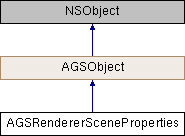
Instances of this class represent properties of a renderer that only apply when features or graphics are visualized through AGSSceneView.
- Since
- 100
Instance Methods | |
| (instancetype) | - initWithExtrusionExpression:extrusionMode: |
| (instancetype) | - initWithHeadingExpression:pitchExpression:rollExpression: |
Class Methods | |
| (instancetype) | + rendererSceneProperties |
| (instancetype) | + rendererScenePropertiesWithExtrusionExpression:extrusionMode: |
| (instancetype) | + rendererScenePropertiesWithHeadingExpression:pitchExpression:rollExpression: |
Properties | |
| NSString * | extrusionExpression |
| AGSExtrusionMode | extrusionMode |
| NSString * | headingExpression |
| NSString * | pitchExpression |
| NSString * | rollExpression |
Method Documentation
§ initWithExtrusionExpression:extrusionMode:()
| - (instancetype) initWithExtrusionExpression: | (NSString *) | extrusionExpression | |
| extrusionMode: | (AGSExtrusionMode) | extrusionMode | |
Initialize renderer scene properties with provided parameters
- Parameters
-
extrusionExpression specifying how much the data should be extruded for display extrusionMode specifying how the data should be extruded
- Returns
- Initialized renderer scene properties
- Since
- 100
§ initWithHeadingExpression:pitchExpression:rollExpression:()
| - (instancetype) initWithHeadingExpression: | (NSString *) | headingExpression | |
| pitchExpression: | (NSString *) | pitchExpression | |
| rollExpression: | (NSString *) | rollExpression | |
Initialize renderer scene properties with provided parameters
- Parameters
-
headingExpression specifying how much to adjust the heading of data for display pitchExpression specifying how much to adjust the pitch of data for display rollExpression specifying how much to adjust the roll of data for display
- Returns
- Initialized renderer scene properties
- Since
- 100
§ rendererSceneProperties()
| + (instancetype) rendererSceneProperties |
§ rendererScenePropertiesWithExtrusionExpression:extrusionMode:()
| + (instancetype) rendererScenePropertiesWithExtrusionExpression: | (NSString *) | extrusionExpression | |
| extrusionMode: | (AGSExtrusionMode) | extrusionMode | |
Initialize renderer scene properties with provided parameters
- Parameters
-
extrusionExpression specifying how much the data should be extruded for display extrusionMode specifying how the data should be extruded
- Returns
- Initialized renderer scene properties
- Since
- 100
§ rendererScenePropertiesWithHeadingExpression:pitchExpression:rollExpression:()
| + (instancetype) rendererScenePropertiesWithHeadingExpression: | (NSString *) | headingExpression | |
| pitchExpression: | (NSString *) | pitchExpression | |
| rollExpression: | (NSString *) | rollExpression | |
Initialize renderer scene properties with provided parameters
- Parameters
-
headingExpression specifying how much to adjust the heading of data for display pitchExpression specifying how much to adjust the pitch of data for display rollExpression specifying how much to adjust the roll of data for display
- Returns
- Initialized renderer scene properties
- Since
- 100
Property Documentation
§ extrusionExpression
|
readwritenonatomiccopy |
Expression specifying how to extrude the geo-elements for display. The expression can contain the name of the attribute of the feature or graphic. For example, the expression storeys * 3.5 indicates that the renderer will look up the value of the "storeys" attribute and multiply it by 3.5, and then use that value to extrude the data in z-direction. The value is interpreted to be in meters.
When extrusion is applied to points, they are always extruded as cylinders irrespective of the style.
- Since
- 100
- See also
extrusionMode
§ extrusionMode
|
readwritenonatomicassign |
§ headingExpression
|
readwritenonatomiccopy |
Expression specifying how to adjust the heading of geo-elements for display. Heading is the angle, clockwise, from North in an ENU (East, North, Up Ground reference frames). Values range from 0 to 360 degrees.
The expression can contain the name of an attribute of the feature or graphic. For example, the expression "[heading] + 15" indicates that the renderer will look up the value of the "heading" attribute and add 15 to it, and then use that value to set the heading of the geo-element.
- Since
- 100
§ pitchExpression
|
readwritenonatomiccopy |
Expression specifying how to adjust the pitch of geo-elements. Pitch is the angle of rotation around the Y-axis in an ENU (East, North, Up Ground reference frames). Value ranges from 0 to 180 degrees, where 0 is looking straight down (center of the earth) and 180 looking straight up (towards outer space).
The expression can contain the name of an attribute of the feature or graphic. For example, the expression "[tilt] - 90" indicates that the renderer will look up the value of the "tilt" attribute and subtract 90 from it, and then use that value to set the pitch of the geo-element.
- Since
- 100
§ rollExpression
|
readwritenonatomiccopy |
Expression specifying how to adjust the roll of geo-elements for display. Roll is the angle of rotation around the X-axis in an ENU (East, North, Up Ground reference frames). Value ranges from 0 to 360 degrees, where 0 is horizontal.
The expression can contain the name of an attribute of the feature or graphic. For example, the expression "[bank] - 180" indicates that the renderer will look up the value of the "bank" attribute and subtract 180 from it, and then use that value to set the roll of the geo-element.
- Since
- 100