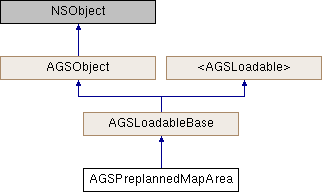
Represents an individual preplanned map area.
Instances of this class represent an individual preplanned map area.
Preplanned map areas are specific work areas or major incident areas that are defined by a map author. Each map can contain a number of preplaned map areas. These can be retrieved using getPreplannedMapAreasWithCompletion: (AGSOfflineMapTask)
Each preplanned map area contains map content that is packaged and staged for easy download that speeds up the process of taking a map offline. Preplanned map areas can be downloaded to create an offline map using downloadPreplannedOfflineMapJobWithArea:downloadDirectory: (AGSOfflineMapTask)
To successfully load an AGSPreplannedMapArea, the AGSPreplannedMapArea::packagingStatus must be AGSPreplannedPackagingStatusComplete.
- Since
- 100.2
| - (void) loadWithCompletion: |
|
(nullable void(^)(NSError *__nullable error)) |
completion |
|
|
requiredinherited |
Loads data for the object asynchronously. The completion block is invoked upon completion.
You can call this method any number of times, however only one attempt is made to load the data. If it is already loading, it will just continue to load (i.e. not force a reload). If it has already loaded successfully, the completion block will be invoked right away. If it has already failed to load, the completion block will be invoked right away with error previously encountered. This method supports multiple callers and will call them all back on completion. However, each caller's completion block will be invoked once and only once.
- Parameters
-
| completion | block that is invoked when object loads successfully or fails to load. An error is passed to the block if the object fails to load. |
- Note
- The completion block is always invoked on the main thread.
- Since
- 100
- See also
- cancelLoad to cancel loading -
- retryLoadWithCompletion: to force reload
| - (void) retryLoadWithCompletion: |
|
(nullable void(^)(NSError *__nullable error)) |
completion |
|
|
requiredinherited |
Tries to reload when an object has failed to load. This method should be called judiciously. It should be called when:
- you didn't have network connectivity earlier when it failed and you want to retry now that you have connectivity
- the server was down earlier when it failed and you want to retry
- the request is taking too long and you want to cancel it and retry, in which case you will first call
cancelLoad and then this method
If the data hasn't started loading, it will start loading. If it is already loading, it will just continue to load. If it has already loaded successfully, calls back right away. If it has already failed to load, tries again. This method supports multiple callers and will call them all back on completion. However, each caller's completion block will be invoked once and only once.
- Parameters
-
| completion | block that is invoked when object loads successfully or fails to load. An error is passed to the block if the object fails to load. |
- Note
- The completion block is always invoked on the main thread.
- Since
- 100
Describes the packaging status of the online map area.
This property allows you to check whether an online AGSPreplannedMapArea is in an AGSPreplannedPackagingStatusComplete state and ready to be downloaded. If you attempt to load an AGSPreplannedMapArea that is not AGSPreplannedPackagingStatusComplete, the AGSPreplannedMapArea will fail to load with an error of AGSErrorCodeMappingPackagingNotComplete.
There are four possible values:
AGSPreplannedPackagingStatusComplete indicates the map area is ready for download and the data has been packaged. AGSPreplannedPackagingStatusProcessing indicates that the online map area is not yet ready to be downloaded. The packages required for the map area have not been packaged yet. This status will be available after the AGSPreplannedMapArea fails to load. AGSPreplannedPackagingStatusFailed indicates that an error was encountered whilst preparing the online map area or its packages. In this scenario, the map area cannot be downloaded until the web map author has resolved the errors. This status will be available after the AGSPreplannedMapArea fails to load. AGSPreplannedPackagingStatusUnknown indicates that the metadata for the map area has not been fetched. This will be the value when the map area is AGSLoadStatusNotLoaded.
If the packaging status is AGSPreplannedPackagingStatusProcessing, you can check it again following these steps:
- Create a new
AGSPortalItem instance using the AGSPortalItem::URL in the AGSPreplannedMapArea::portalItem.
- Create a new
AGSPreplannedMapArea using the portal item initWithPortalItem:.
- Load the
AGSPreplannedMapArea and check AGSPreplannedMapArea::packagingStatus. - Since
- 100.9