Description
A task to take a map offline.
Taking a map offline involves downloading an online map and its data, including all the supported layers, tables, renderers, web map configuration etc. so that it can be used offline without a network connection. There are two workflows available for taking maps offline:
- the preplanned offline workflow and
- the on-demand offline workflow.
Preplanned offline workflow In this workflow the author of an online map can define individual geographical areas called map areas. These map areas prepare map content that is stored online. An app can download that map content to a device using the AGSDownloadPreplannedOfflineMapJob.
On-demand offline workflow Here the app passes a specific area of interest to an AGSGenerateOfflineMapJob to generate and download the map content to the device. Using this workflow, you can choose to keep online only services (e.g. those that require a network connection) in your offline map. Be aware that an offline map which uses online only services will require a network connection and may require authentication.
- Since
- 100.1
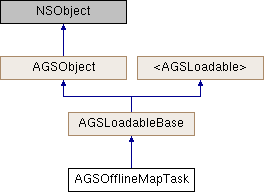
Class Methods | |
| (instancetype) | + offlineMapTaskWithOnlineMap: |
| (instancetype) | + offlineMapTaskWithPortalItem: |
Properties | |
| NSError * | loadError |
| AGSLoadStatus | loadStatus |
| AGSMap * | onlineMap |
| AGSPortalItem * | portalItem |
Method Documentation
§ cancelLoad()
|
requiredinherited |
Cancels loading if it is in progress, otherwise it does nothing. This should be called carefully because other objects could be waiting for loadWithCompletion: or retryLoadWithCompletion: to complete and this will call them all back with the error of NSUserCancelledError
- Since
- 100
§ defaultDownloadPreplannedOfflineMapParametersWithArea:completion:()
| - (id<AGSCancelable>) defaultDownloadPreplannedOfflineMapParametersWithArea: | (AGSPreplannedMapArea *) | preplannedMapArea | |
| completion: | (void(^)(AGSDownloadPreplannedOfflineMapParameters *__nullable params, NSError *__nullable error)) | completion | |
A convenience method to create the AGSDownloadPreplannedOfflineMapParameters with default values, appropriate for taking the specified map area offline. The default parameters will be populated using the values in the online map's offline settings (if present).
- Parameters
-
preplannedMapArea The preplanned region of the online map that is to be taken offline. completion block that is invoked with the initialized params if the method succeeds, or an error if it fails
- Returns
- operation that can be canceled
- Since
- 100.5
§ defaultGenerateOfflineMapParametersWithAreaOfInterest:completion:()
| - (id<AGSCancelable>) defaultGenerateOfflineMapParametersWithAreaOfInterest: | (AGSGeometry *) | areaOfInterest | |
| completion: | (void(^)(AGSGenerateOfflineMapParameters *__nullable params, NSError *__nullable error)) | completion | |
A convenience method to get properly initialized parameters for generating an offline map.
This will populate the parameters with values matching what the service supports. For example if the service does not support PER_LAYER sync model then PER_GEODATABASE will be used. All layers from the service will be included. The extent will be the service's full extent. Attachments are included by default, but related tables/layers are not included.
The returned parameter's min scale and max scale are zero and that'll include tiles for the full range of scales the tiled layers support when taking the map offline. The itemInfo property of the parameter is initialized based this task's portal item, if that is set, and will include the item's thumbnail.
- Parameters
-
areaOfInterest An AGSPolygonorAGSEnvelopegeometry that defines the geographic area for which the map data should be taken offlinecompletion block that is invoked with the initialized params if the method succeeds, or an error if it fails
- Returns
- operation that can be canceled
- Since
- 100.1
§ defaultGenerateOfflineMapParametersWithAreaOfInterest:minScale:maxScale:completion:()
| - (id<AGSCancelable>) defaultGenerateOfflineMapParametersWithAreaOfInterest: | (AGSGeometry *) | areaOfInterest | |
| minScale: | (double) | minScale | |
| maxScale: | (double) | maxScale | |
| completion: | (void(^)(AGSGenerateOfflineMapParameters *__nullable params, NSError *__nullable error)) | completion | |
Provides parameters to generate an offline map with the specified area of interest, min scale and max scale.
- Note
- The area of interest must have a spatial reference. The returned
AGSGenerateOfflineMapParametershas itsitemInfoproperty initialized from the offline map task's portal item, if that is set. TheitemInfo'sthumbnail will be copied from the portal item's thumbnail.
- Parameters
-
areaOfInterest An AGSPolygonorAGSEnvelopegeometry that defines the geographic area for which the map data should be taken offlineminScale The minimum scale for offline tile caches. Use 0 for all far out levels. See the property AGSGenerateOfflineMapParameters::minScale.maxScale The maximum scale for offline tile caches. Use 0 for closer in detailed levels. Sets the property AGSGenerateOfflineMapParameters::maxScale.completion block that is invoked with the initialized params if the method succeeds, or an error if it fails
- Returns
- operation that can be canceled
- Since
- 100.4
§ downloadPreplannedOfflineMapJobWithArea:downloadDirectory:()
| - (AGSDownloadPreplannedOfflineMapJob*) downloadPreplannedOfflineMapJobWithArea: | (AGSPreplannedMapArea *) | preplannedMapArea | |
| downloadDirectory: | (NSURL *) | downloadDirectory | |
Returns a job which can be used to download an offline map for a preplanned map area. The result of the job will be of type AGSDownloadPreplannedOfflineMapResult.
- Note
- The job is dormant and needs to be explicitly started using
startWithStatusHandler:completion: (AGSGenerateOfflineMapJob)
- Parameters
-
preplannedMapArea map area for which the data has already been pacakged and staged for download downloadDirectory directory to download the offline map and its contents to
- Returns
- job to download the offline map. The job will fail if download directory cannot be created or is not empty.
- Since
- 100.2
- See also
- getPreplannedMapAreasWithCompletion:to get a list of preplanned map areas for the map this task'sonlineMap
§ downloadPreplannedOfflineMapJobWithArea:downloadDirectory:excludeBasemap:()
| - (AGSDownloadPreplannedOfflineMapJob*) downloadPreplannedOfflineMapJobWithArea: | (AGSPreplannedMapArea *) | preplannedMapArea | |
| downloadDirectory: | (NSURL *) | downloadDirectory | |
| excludeBasemap: | (BOOL) | excludeBasemap | |
Returns a job which can be used to download an offline map for a preplanned map area. The result of the job will be of type AGSDownloadPreplannedOfflineMapResult. If you exclude the map's basemap from the download the offline map's size will be smaller and consequently the download process will be faster. If you already have a basemap stored locally on your device you can add that to the offline map.
- Note
- The job is dormant and needs to be explicitly started using
startWithStatusHandler:completion: (AGSGenerateOfflineMapJob)
- Parameters
-
preplannedMapArea map area for which the data has already been pacakged and staged for download downloadDirectory directory to download the offline map and its contents to excludeBasemap indicating whether or not to exclude the basemap in the offline map
- Returns
- job to download the offline map. The job will fail if download directory cannot be created or is not empty. Excluding the basemap will override the authored settings of preplanned map area and always exclude the basemap content.
- Since
- 100.2
- See also
- getPreplannedMapAreasWithCompletion:to get a list of preplanned map areas for the map this task'sonlineMap
§ downloadPreplannedOfflineMapJobWithParameters:downloadDirectory:()
| - (AGSDownloadPreplannedOfflineMapJob*) downloadPreplannedOfflineMapJobWithParameters: | (AGSDownloadPreplannedOfflineMapParameters *) | parameters | |
| downloadDirectory: | (NSURL *) | downloadDirectory | |
Returns a job which can be used to download an offline map for a preplanned map area using the specified parameters. The result of the job will be of type AGSDownloadPreplannedOfflineMapResult.
- Note
- The job is dormant and needs to be explicitly started using
startWithStatusHandler:completion: (AGSGenerateOfflineMapJob)
- Parameters
-
parameters AGSDownloadPreplannedOfflineMapParametersspecify how to take a map offline. For example, specify the area of interest, min and max scale, layer attachment optionsdownloadDirectory directory to download the offline map and its contents to
- Returns
- job to download the offline map. The job will fail if download directory cannot be created or is not empty.
- Since
- 100.4
- See also
- getPreplannedMapAreasWithCompletion:to get a list of preplanned map areas for the map this task'sonlineMap
§ generateOfflineMapJobWithParameters:downloadDirectory:()
| - (AGSGenerateOfflineMapJob *) generateOfflineMapJobWithParameters: | (AGSGenerateOfflineMapParameters *) | parameters | |
| downloadDirectory: | (NSURL *) | downloadDirectory | |
Returns a job which can be used to generate an offline map using the specified parameters. The result of the job will be of type AGSGenerateOfflineMapResult.
- Note
- The job is dormant and needs to be explicitly started using
startWithStatusHandler:completion: (AGSGenerateOfflineMapJob)
- Parameters
-
parameters specifying how to take a map offline downloadDirectory where the offline map should be saved on disk. If the directory exists it should be empty otherwise the operation will fail. If the directory doesn't exist, it will be created by the job.
- Returns
- job to generate an offline map. The result of the job will be of type
AGSGenerateOfflineMapResult. The job will fail if download directory cannot be created or is not empty.
- Since
- 100.1
§ generateOfflineMapJobWithParameters:parameterOverrides:downloadDirectory:()
| - (AGSGenerateOfflineMapJob *) generateOfflineMapJobWithParameters: | (AGSGenerateOfflineMapParameters *) | parameters | |
| parameterOverrides: | (AGSGenerateOfflineMapParameterOverrides *) | parameterOverrides | |
| downloadDirectory: | (NSURL *) | downloadDirectory | |
Returns a job that is used to generate an offline map using the specified parameters and overrides.
- Note
- The job that is returned is dormant and needs to be explicitly started. The job will fail if the last directory in the download directory path cannot be created or is not empty. The
AGSGenerateOfflineMapParameterOverridesallows more control over the extracted data. To create an instanceAGSGenerateOfflineMapParameterOverridesusegenerateOfflineMapParameterOverridesWithParameters:completion:.
Some properties on AGSGenerateOfflineMapParameters will be ignored when using AGSGenerateOfflineMapParameterOverrides and replaced with equivalent properties for each service. The overridden properties are:
AGSGenerateOfflineMapParameters::includeBasemapAGSGenerateOfflineMapParameters::returnLayerAttachmentOptionAGSGenerateOfflineMapParameters::attachmentSyncDirectionAGSGenerateOfflineMapParameters::returnSchemaOnlyForEditableLayersAGSGenerateOfflineMapParameters::definitionExpressionFilterEnabledAGSGenerateOfflineMapParameters::onlineOnlyServicesOption
- Parameters
-
parameters The parameters specifying how to take a map offline. For example, specify the area of interest, min and max scale, layer attachment options parameterOverrides The overrides to the parameters downloadDirectory where the offline map should be saved on disk. If the directory exists it should be empty otherwise the operation will fail. If the directory doesn't exist, it will be created by the job.
- Returns
- job to generate an offline map. The result of the job will be of type
AGSGenerateOfflineMapResult. The job will fail if download directory cannot be created or is not empty.
- Since
- 100.4
§ generateOfflineMapParameterOverridesWithParameters:completion:()
| - (id<AGSCancelable>) generateOfflineMapParameterOverridesWithParameters: | (AGSGenerateOfflineMapParameters *) | parameters | |
| completion: | (void(^)(AGSGenerateOfflineMapParameterOverrides *__nullable parameterOverrides, NSError *__nullable error)) | completion | |
Provides overrides for AGSGenerateOfflineMapParameters. Upon successful completion, a AGSGenerateOfflineMapParameterOverrides instance will be populated reflecting the values in the AGSGenerateOfflineMapParameters parameters. The overrides may be inspected and modified to change the offline data before creating a job with generateOfflineMapJobWithParameters:parameterOverrides:downloadDirectory:.
If there are errors with loading individual layers or tables, or they cannot be taken offline due to service settings, the outcome depends on the value of AGSGenerateOfflineMapParameters::continueOnErrors. If true, the overrides correspond to the remaining layers and tables that can go offline. The resulting offline map will not contain the layers or tables which had errors. If AGSGenerateOfflineMapParameters::continueOnErrors is false, the task will fail immediately with an exception from the failed layer or table. To check upfront which layers or tables are valid for taking offline see AGSOfflineMapTask::getOfflineMapCapabilitiesWithParameters.
- Since
- 100.4
§ getOfflineMapCapabilitiesWithParameters:completion:()
| - (id<AGSCancelable>) getOfflineMapCapabilitiesWithParameters: | (AGSGenerateOfflineMapParameters *) | parameters | |
| completion: | (void(^)(AGSOfflineMapCapabilities *__nullable params, NSError *__nullable error)) | completion | |
Provides information about offline capabilities of the map, such as which layers will be included in an offline map.
- Parameters
-
parameters specifying how to take the map offline completion block that is invoked with offline capabilities of the map if the operation succeeds, or an error if it fails
- Returns
- operation that can be canceled
- Since
- 100.1
§ getPreplannedMapAreasWithCompletion:()
| - (id<AGSCancelable>) getPreplannedMapAreasWithCompletion: | (void(^)(NSArray< AGSPreplannedMapArea * > *__nullable preplannedMapAreas, NSError *__nullable error)) | completion |
Get a list of preplanned map areas that are available for this task's onlineMap. Preplanned map areas already have the map data packaged and staged for download which speeds up taking a map offline.
- Note
- Calling this method will load the
AGSOfflineMapTaskif it is not already loaded.
- Parameters
-
completion block that is invoked with the list of preplanned map areas if the operation succeeds, or an error if it fails
- Returns
- operation that can be canceled
- Since
- 100.2
§ initWithOnlineMap:()
| - (instancetype) initWithOnlineMap: | (AGSMap *) | onlineMap |
Initialize the task with the provided map to take offline. The map must be a web map either on ArcGIS Online or an on-premises ArcGIS Portal.
- Parameters
-
onlineMap to take offline
- Returns
- a new intitalized task
- Since
- 100.1
§ initWithPortalItem:()
| - (instancetype) initWithPortalItem: | (AGSPortalItem *) | portalItem |
Initialize the task with the provided portal item. The item must represent a web map (item type should be AGSPortalItemTypeWebMap) either on ArcGIS Online or an on-premises ArcGIS Portal.
- Parameters
-
portalItem specifying a map to take offline
- Returns
- a new intitalized task
- Since
- 100.1
§ loadWithCompletion:()
|
requiredinherited |
Loads data for the object asynchronously. The completion block is invoked upon completion.
You can call this method any number of times, however only one attempt is made to load the data. If it is already loading, it will just continue to load (i.e. not force a reload). If it has already loaded successfully, the completion block will be invoked right away. If it has already failed to load, the completion block will be invoked right away with error previously encountered. This method supports multiple callers and will call them all back on completion. However, each caller's completion block will be invoked once and only once.
- Parameters
-
completion block that is invoked when object loads successfully or fails to load. An error is passed to the block if the object fails to load.
- Note
- The completion block is always invoked on the main thread.
- Since
- 100
- See also
- cancelLoadto cancel loading-
- retryLoadWithCompletion:to force reload
§ offlineMapTaskWithOnlineMap:()
| + (instancetype) offlineMapTaskWithOnlineMap: | (AGSMap *) | onlineMap |
Initialize the task with the provided map to take offline. The map must be a web map either on ArcGIS Online or an on-premises ArcGIS Portal.
- Parameters
-
onlineMap to take offline
- Returns
- a new intitalized task
- Since
- 100.1
§ offlineMapTaskWithPortalItem:()
| + (instancetype) offlineMapTaskWithPortalItem: | (AGSPortalItem *) | portalItem |
Initialize the task with the provided portal item. The item must represent a web map (item type should be AGSPortalItemTypeWebMap) either on ArcGIS Online or an on-premises ArcGIS Portal.
- Parameters
-
portalItem specifying a map to take offline
- Returns
- a new intitalized task
- Since
- 100.1
§ retryLoadWithCompletion:()
|
requiredinherited |
Tries to reload when an object has failed to load. This method should be called judiciously. It should be called when:
- you didn't have network connectivity earlier when it failed and you want to retry now that you have connectivity
- the server was down earlier when it failed and you want to retry
- the request is taking too long and you want to cancel it and retry, in which case you will first call
cancelLoadand then this method
If the data hasn't started loading, it will start loading. If it is already loading, it will just continue to load. If it has already loaded successfully, calls back right away. If it has already failed to load, tries again. This method supports multiple callers and will call them all back on completion. However, each caller's completion block will be invoked once and only once.
- Parameters
-
completion block that is invoked when object loads successfully or fails to load. An error is passed to the block if the object fails to load.
- Note
- The completion block is always invoked on the main thread.
- Since
- 100
Property Documentation
§ loadError
|
readnonatomicstronginherited |
The error that was encountered during the most recent load operation. Will be nil if the operation succeeded.
- Since
- 100
§ loadStatus
|
readrequirednonatomicassigninherited |
Status of the load operation.
- Since
- 100
§ onlineMap
|
readnonatomicstrong |
The map to take offline. The map must be a web map either on ArcGIS Online or an on-premises ArcGIS Portal.
- Since
- 100.1
§ portalItem
|
readnonatomicstrong |
Portal item specifying the map to take offline. The item must represent a web map (item type should be AGSPortalItemTypeWebMap) either on ArcGIS Online or an on-premises ArcGIS Portal.
- Since
- 100.1