Description
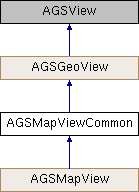
A base class for AGSMapView.
A base class for AGSMapView to facilitate code reuse between iOS and Mac platforms.
- Since
- 100
Properties | |
| AGSEdgeInsets | adjustedContentInset |
| NSString * | attributionText |
| BOOL | attributionTextVisible |
| NSLayoutYAxisAnchor * | attributionTopAnchor |
| AGSBackgroundGrid * | backgroundGrid |
| AGSCallout * | callout |
| AGSEdgeInsets | contentInset |
| AGSDrawStatus | drawStatus |
| NSMutableArray< AGSGraphicsOverlay * > * | graphicsOverlays |
| AGSGrid * | grid |
| AGSMapViewInteractionOptions * | interactionOptions |
| AGSViewLabelProperties * | labeling |
| void(^ | layerViewStateChangedHandler )(AGSLayer *layer, AGSLayerViewState *layerViewState) |
| AGSLocationDisplay * | locationDisplay |
| AGSMap * | map |
| double | mapScale |
| BOOL | navigating |
| BOOL | releaseHardwareResourcesWhenBackgrounded |
| double | rotation |
| AGSSelectionProperties * | selectionProperties |
| AGSSketchEditor * | sketchEditor |
| AGSSpatialReference * | spatialReference |
| AGSTimeExtent * | timeExtent |
| IBOutlet id< AGSGeoViewTouchDelegate > | touchDelegate |
| double | unitsPerPoint |
| void(^ | viewpointChangedHandler )(void) |
| AGSPolygon * | visibleArea |
| BOOL | wrapAroundEnabled |
| AGSWrapAroundMode | wrapAroundMode |
Method Documentation
§ currentViewpointWithType:()
| - (nullable AGSViewpoint*) currentViewpointWithType: | (AGSViewpointType) | viewpointType |
Gets the current viewpoint being displayed. For an AGSMapView, this takes into account the attribution bar and any contentInset that has been specified to return only the unobscured portion of the map.
- Parameters
-
viewpointType specifying how the viewpoint should be represented
- Returns
- viewpoint
- Since
- 100
§ exportImageWithCompletion:()
| - (id<AGSCancelable>) exportImageWithCompletion: | (void(^)(AGSImage *__nullable image, NSError *__nullable error)) | completion |
Provides an image depicting the view's current display.
- Parameters
-
completion block that is invoked when the operation completes
- Returns
- operation which can be canceled
- Since
- 100
§ identifyGraphicsOverlay:screenPoint:tolerance:returnPopupsOnly:completion:()
| - (id<AGSCancelable>) identifyGraphicsOverlay: | (AGSGraphicsOverlay *) | graphicsOverlay | |
| screenPoint: | (CGPoint) | screenPoint | |
| tolerance: | (double) | tolerance | |
| returnPopupsOnly: | (BOOL) | returnPopupsOnly | |
| completion: | (void(^)(AGSIdentifyGraphicsOverlayResult *identifyResult)) | completion | |
Identify (hit-test) the top-most graphic that appears at the specified screen coordinates in the provided graphics overlay.
- Parameters
-
graphicsOverlay in which to identify graphics screenPoint at which to identify graphics tolerance radius in points specifying how precise the identify operation should be. A value of 0 means that it should be extremely precise - only those graphics appearing at the exact coordinates should be returned. A value of 22 (a good default for touch displays which covers an average finger tap) means graphics appearing within a 44pt buffer can also be returned. Max value permitted is 100. returnPopupsOnly specifies what the identify results should contain. If set to YES, only overlays with popups will be retured. If set to NO, all overlays (with or without popups) will be retured. completion block that is invoked when the operation is complete with the result.
- Returns
- operation which can be canceled
- Since
- 100
§ identifyGraphicsOverlay:screenPoint:tolerance:returnPopupsOnly:maximumResults:completion:()
| - (id<AGSCancelable>) identifyGraphicsOverlay: | (AGSGraphicsOverlay *) | graphicsOverlay | |
| screenPoint: | (CGPoint) | screenPoint | |
| tolerance: | (double) | tolerance | |
| returnPopupsOnly: | (BOOL) | returnPopupsOnly | |
| maximumResults: | (NSInteger) | maximumResults | |
| completion: | (void(^)(AGSIdentifyGraphicsOverlayResult *identifyResult)) | completion | |
Identify (hit-test) which graphics appear at the specified screen coordinates in the provided graphics overlay.
- Parameters
-
graphicsOverlay in which to identify graphics screenPoint at which to identify graphics tolerance radius in points specifying how precise the identify operation should be. A value of 0 means that it should be extremely precise - only those graphics appearing at the exact coordinates should be returned. A value of 22 (a good default for touch displays which covers an average finger tap) means graphics appearing within a 44 pt buffer can also be returned. Max value permitted is 100. returnPopupsOnly specifies what the identify results should contain. If set to YES, only overlays with popups will be retured. If set to NO, all overlays (with or without popups) will be retured. maximumResults that should be returned as the result completion block that is invoked when the operation is complete with the result.
- Returns
- operation which can be canceled
- Since
- 100
§ identifyGraphicsOverlaysAtScreenPoint:tolerance:returnPopupsOnly:completion:()
| - (id<AGSCancelable>) identifyGraphicsOverlaysAtScreenPoint: | (CGPoint) | screenPoint | |
| tolerance: | (double) | tolerance | |
| returnPopupsOnly: | (BOOL) | returnPopupsOnly | |
| completion: | (void(^)(NSArray< AGSIdentifyGraphicsOverlayResult * > *__nullable identifyResults, NSError *__nullable error)) | completion | |
Identify (hit-test) the top-most graphic that appears at the specified screen coordinates in all the graphics overlays.
- Parameters
-
screenPoint at which to identify graphics tolerance radius in points specifying how precise the identify operation should be. A value of 0 means that it should be extremely precise - only those graphics at that exact coordinates should be returned. A value of 22 (a good default for touch displays which covers an average finger tap) means graphics within a 44pt buffer can also be returned. Max value permitted is 100. returnPopupsOnly specifies what the identify results should contain. If set to YES, only overlays with popups will be retured. If set to NO, all overlays (with or without popups) will be retured. completion block that is invoked when the operation is complete with either the results or an error.
- Returns
- operation which can be canceled
- Since
- 100
§ identifyGraphicsOverlaysAtScreenPoint:tolerance:returnPopupsOnly:maximumResultsPerOverlay:completion:()
| - (id<AGSCancelable>) identifyGraphicsOverlaysAtScreenPoint: | (CGPoint) | screenPoint | |
| tolerance: | (double) | tolerance | |
| returnPopupsOnly: | (BOOL) | returnPopupsOnly | |
| maximumResultsPerOverlay: | (NSInteger) | maximumResultsPerOverlay | |
| completion: | (void(^)(NSArray< AGSIdentifyGraphicsOverlayResult * > *__nullable identifyResults, NSError *__nullable error)) | completion | |
Identify (hit-test) which graphics appear at the specified screen coordinates in all the graphics overlays.
- Parameters
-
screenPoint at which to identify graphics tolerance radius in points specifying how precise the identify operation should be. A value of 0 means that it should be extremely precise - only those graphics at that exact coordinates should be returned. A value of 22 (a good default for touch displays which covers an average finger tap) means graphics within a 44pt buffer can also be returned. Max value permitted is 100. returnPopupsOnly specifies what the identify results should contain. If set to YES, only overlays with popups will be retured. If set to NO, all overlays (with or without popups) will be retured. maximumResultsPerOverlay that should be returned for each overlay in the result completion block that is invoked when the operation is complete with either the results or an error.
- Returns
- operation which can be canceled
- Since
- 100
§ identifyLayer:screenPoint:tolerance:returnPopupsOnly:completion:()
| - (id<AGSCancelable>) identifyLayer: | (AGSLayer *) | layer | |
| screenPoint: | (CGPoint) | screenPoint | |
| tolerance: | (double) | tolerance | |
| returnPopupsOnly: | (BOOL) | returnPopupsOnly | |
| completion: | (void(^)(AGSIdentifyLayerResult *identifyResult)) | completion | |
Identify (hit-test and/or spatially query) the top-most feature that appears at the specified screen coordinates in the provided layer.
- Parameters
-
layer in which to identify features screenPoint at which to identify features tolerance radius in points specifying how precise the identify operation should be. A value of 0 means that it should be extremely precise - only those features appearing at the exact coordinates should be returned. A value of 22 (a good default for touch displays which covers an average finger tap) means features appearing within a 44pt buffer can also be returned. Max value permitted is 100. returnPopupsOnly specifies what the identify results should contain. If set to YES, only layers with popups will be retured. If the layer does not have popups an error will be returned. If set to NO, all layers (with or without popups) will be retured. completion block that is invoked when the operation is complete with the result.
- Returns
- operation which can be canceled
- Since
- 100
§ identifyLayer:screenPoint:tolerance:returnPopupsOnly:maximumResults:completion:()
| - (id<AGSCancelable>) identifyLayer: | (AGSLayer *) | layer | |
| screenPoint: | (CGPoint) | screenPoint | |
| tolerance: | (double) | tolerance | |
| returnPopupsOnly: | (BOOL) | returnPopupsOnly | |
| maximumResults: | (NSInteger) | maximumResults | |
| completion: | (void(^)(AGSIdentifyLayerResult *identifyResult)) | completion | |
Identify (hit-test and/or spatially query) all features that appear at the specified screen coordinates in the provided layer.
- Parameters
-
layer in which to identify features screenPoint at which to identify features tolerance radius in points specifying how precise the identify operation should be. A value of 0 means that it should be extremely precise - only those features appearing at the exact coordinates should be returned. A value of 22 (a good default for touch displays which covers an average finger tap) means features appearing within a 44pt buffer can also be returned. Max value permitted is 100. returnPopupsOnly specifies what the identify results should contain. If set to YES, only layers with popups will be retured. If the layer does not have popups an error will be returned. If set to NO, all layers (with or without popups) will be retured. maximumResults to return completion block that is invoked when the operation is complete with the result.
- Returns
- operation which can be canceled
- Since
- 100
§ identifyLayersAtScreenPoint:tolerance:returnPopupsOnly:completion:()
| - (id<AGSCancelable>) identifyLayersAtScreenPoint: | (CGPoint) | screenPoint | |
| tolerance: | (double) | tolerance | |
| returnPopupsOnly: | (BOOL) | returnPopupsOnly | |
| completion: | (void(^)(NSArray< AGSIdentifyLayerResult * > *__nullable identifyResults, NSError *__nullable error)) | completion | |
Identify (hit-test and/or spatially query) the top-most feature that appears at the specified screen coordinates in each of the map's layers.
- Parameters
-
screenPoint at which to identify features tolerance radius in points specifying how precise the identify operation should be. A value of 0 means that it should be extremely precise - only those features appearing at the exact coordinates should be returned. A value of 22 (a good default for touch displays which covers an average finger tap) means features appearing within a 44pt buffer can also be returned. Max value permitted is 100. returnPopupsOnly specifies what the identify results should contain. If set to YES, only layers with popups will be retured. If the layer does not have popups an error will be returned. If set to NO, all layers (with or without popups) will be retured. completion block that is invoked when the operation is complete with either the results or an error.
- Returns
- operation which can be canceled
- Since
- 100
§ identifyLayersAtScreenPoint:tolerance:returnPopupsOnly:maximumResultsPerLayer:completion:()
| - (id<AGSCancelable>) identifyLayersAtScreenPoint: | (CGPoint) | screenPoint | |
| tolerance: | (double) | tolerance | |
| returnPopupsOnly: | (BOOL) | returnPopupsOnly | |
| maximumResultsPerLayer: | (NSInteger) | maximumResultsPerLayer | |
| completion: | (void(^)(NSArray< AGSIdentifyLayerResult * > *__nullable identifyResults, NSError *__nullable error)) | completion | |
Identify (hit-test and/or spatially query) which features appear at the specified screen coordinates in all the map's layers.
- Parameters
-
screenPoint at which to identify features tolerance radius in points specifying how precise the identify operation should be. A value of 0 means that it should be extremely precise - only those features appearing at the exact coordinates should be returned. A value of 22 (a good default for touch displays which covers an average finger tap) means features appearing within a 44pt buffer can also be returned. Max value permitted is 100. returnPopupsOnly specifies what the identify results should contain. If set to YES, only layers with popups will be retured. If the layer does not have popups an error will be returned. If set to NO, all layers (with or without popups) will be retured. maximumResultsPerLayer to return completion block that is invoked when the operation is complete with either the results or an error.
- Returns
- operation which can be canceled
- Since
- 100
§ layerViewStateForLayer:()
| - (nullable AGSLayerViewState*) layerViewStateForLayer: | (AGSLayer *) | layer |
Get the current view state for a map or scene layer
- Parameters
-
layer to get the view state for
- Returns
- view state
- Since
- 100
§ locationToScreen:()
| - (CGPoint) locationToScreen: | (AGSPoint *) | mapLocation |
Converts the specified location in map units to a point in screen units.
- Parameters
-
mapLocation to convert
- Returns
- screen point
- Since
- 100
§ screenToLocation:()
| - (AGSPoint*) screenToLocation: | (CGPoint) | screen |
Converts the specified screen point to a map location
- Parameters
-
screen point to convert
- Returns
- map location
- Since
- 100
§ setBookmark:completion:()
| - (id<AGSCancelable>) setBookmark: | (AGSBookmark *) | bookmark | |
| completion: | (nullable void(^)(BOOL finished)) | completion | |
Zoom or pan with animation to the viewpoint specified by the provided bookmark
- Parameters
-
bookmark whose viewpoint will be used to pan/zoom to. completion block which is invoked when operation completes. The finishedargument indicates whether the animation continued until the end without any interruption.
- Since
- 100.2
§ setViewpoint:()
| - (void) setViewpoint: | (AGSViewpoint *) | viewpoint |
Zoom or pan without animation to the specified viewpoint.
- Parameters
-
viewpoint to zoom/pan to
- Since
- 100
- See also
- setViewpoint:completion:to zoom/pan with animation.
§ setViewpoint:completion:()
| - (id<AGSCancelable>) setViewpoint: | (AGSViewpoint *) | viewpoint | |
| completion: | (nullable void(^)(BOOL finished)) | completion | |
Zoom or pan with animation to the specified viewpoint. Animates over 0.25 seconds. See setViewpoint:duration:completion: to set viewpoint that animates over a specific duration.
- Parameters
-
viewpoint to zoom/pan to completion block which is invoked when operation completes. The finishedargument indicates whether the animation continued until the end without any interruption.
- Returns
- operation which can be canceled
- Since
- 100
§ setViewpoint:duration:completion:()
| - (id<AGSCancelable>) setViewpoint: | (AGSViewpoint *) | viewpoint | |
| duration: | (double) | duration | |
| completion: | (nullable void(^)(BOOL finished)) | completion | |
Zoom or pan with animation to the specified viewpoint. Animates over the specified duration.
- Parameters
-
viewpoint to zoom/pan to duration for the zoom/pan animation in seconds completion block which is invoked when operation completes. The finishedargument indicates whether the animation continued until the end without any interruption.
- Returns
- operation which can be canceled
- Since
- 100
§ setViewpoint:duration:curve:completion:()
| - (id<AGSCancelable>) setViewpoint: | (AGSViewpoint *) | viewpoint | |
| duration: | (double) | duration | |
| curve: | (AGSAnimationCurve) | curve | |
| completion: | (nullable void(^)(BOOL finished)) | completion | |
Zoom or pan the map with animation to the specified viewpoint.
- Parameters
-
viewpoint to zoom/pan to duration for the zoom/pan animation curve Type of animation completion block which is invoked when operation completes. The finishedargument indicates whether animation finished without any user interruption.
- Returns
- operation which can be canceled
- Note
- Any prior
setViewpoint...animation will be canceled upon calling this method. If you want to chain together mulitple animations, wait for the prior animation to complete before calling this method.
- Since
- 100
§ setViewpointCenter:completion:()
| - (id<AGSCancelable>) setViewpointCenter: | (AGSPoint *) | center | |
| completion: | (nullable void(^)(BOOL finished)) | completion | |
Zoom or pan the map with animation to the specified location.
- Parameters
-
center Location on which the map should be centered completion block which is invoked when operation completes. The finishedargument indicates whether animation finished without any user interruption.
- Returns
- operation which can be canceled
- Note
- Any prior
setViewpoint...animation will be canceled upon calling this method. If you want to chain together mulitple animations, wait for the prior animation to complete before calling this method.
- Since
- 100
§ setViewpointCenter:scale:completion:()
| - (id<AGSCancelable>) setViewpointCenter: | (AGSPoint *) | center | |
| scale: | (double) | scale | |
| completion: | (nullable void(^)(BOOL finished)) | completion | |
Zoom or pan the map with animation to the specified location.
- Parameters
-
center Location on which the map should be centered scale to which the map should be zoomed to completion block which is invoked when operation completes. The finishedargument indicates whether animation finished without any user interruption.
- Returns
- operation which can be canceled
- Note
- Any prior
setViewpoint...animation will be canceled upon calling this method. If you want to chain together mulitple animations, wait for the prior animation to complete before calling this method.
- Since
- 100
§ setViewpointGeometry:completion:()
| - (id<AGSCancelable>) setViewpointGeometry: | (AGSGeometry *) | geometry | |
| completion: | (nullable void(^)(BOOL finished)) | completion | |
Zoom or pan the map with animation such that the given geometry fits the bounds of the map.
- Parameters
-
geometry to fit to the bounds of the map completion block which is invoked when operation completes. The finishedargument indicates whether animation finished without any user interruption.
- Returns
- operation which can be canceled
- Note
- Any prior
setViewpoint...animation will be canceled upon calling this method. If you want to chain together mulitple animations, wait for the prior animation to complete before calling this method.
- Since
- 100
§ setViewpointGeometry:padding:completion:()
| - (id<AGSCancelable>) setViewpointGeometry: | (AGSGeometry *) | geometry | |
| padding: | (double) | paddingInScreenPoints | |
| completion: | (nullable void(^)(BOOL finished)) | completion | |
Zoom or pan the map with animation such that the given geometry fits the bounds of the map.
- Parameters
-
geometry to fit to the bounds of the map paddingInScreenPoints to pad in each direction while fitting the geometry completion block which is invoked when operation completes. The finishedargument indicates whether animation finished without any user interruption.
- Returns
- operation which can be canceled
- Note
- Any prior
setViewpoint...animation will be canceled upon calling this method. If you want to chain together mulitple animations, wait for the prior animation to complete before calling this method.
- Since
- 100
§ setViewpointRotation:completion:()
| - (id<AGSCancelable>) setViewpointRotation: | (double) | angle | |
| completion: | (nullable void(^)(BOOL finished)) | completion | |
Rotate the map with animation to the specified angle
- Parameters
-
angle in degress to rotate to (in counter-clockwise direction) completion block which is invoked when operation completes. The finishedargument indicates whether animation finished without any user interruption.
- Returns
- operation which can be canceled
- Note
- Any prior
setViewpoint...animation will be canceled upon calling this method. If you want to chain together mulitple animations, wait for the prior animation to complete before calling this method.
- Since
- 100
§ setViewpointScale:completion:()
| - (id<AGSCancelable>) setViewpointScale: | (double) | scale | |
| completion: | (nullable void(^)(BOOL finished)) | completion | |
Zoom the map with animation to the specified scale around its current center.
- Parameters
-
scale to which the map should be zoomed to completion block which is invoked when operation completes. The finishedargument indicates whether animation finished without any user interruption.
- Returns
- operation which can be canceled
- Note
- Any prior
setViewpoint...animation will be canceled upon calling this method. If you want to chain together mulitple animations, wait for the prior animation to complete before calling this method.
- Since
- 100
Property Documentation
§ adjustedContentInset
|
readnonatomicassign |
The insets derived from the content inset, the height of the attribution bar, and (on iOS) the safe area insets. For iOS, the insetsContentInsetFromSafeArea property determines whether the safe area insets are included in the adjustment.
- Since
- 100.4
§ attributionText
|
readnonatomiccopyinherited |
Attribution for the geographic data currently being displayed in the view. This information is displayed in a banner along the bottom edge of the view.
- Since
- 100.1
§ attributionTextVisible
|
readwritenonatomicassigninherited |
Specifies whether the attribution text banner (along the bottom edge of the view) should be visible . Defaults to true
- Since
- 100
§ attributionTopAnchor
|
readnonatomicstronginherited |
The NSLayoutAnchor you can use to layout views in relationship to the attribution text on the AGSGeoView. This is helpful if you want to place a view just above the attribution text. And when the attribution text is collapsed or expanded your view will automatically move to the correct location in relation to the attribution text.
- Since
- 100.1
§ backgroundGrid
|
readwritenonatomicstrong |
Various settings applied to the map view's background. The background grid determines the color and context grid of a map view when no AGSMapView::map has been set.
The AGSMap displays on top of the background grid or the optional AGSMap::backgroundColor to determine what is displayed under transparent areas of the map.
If AGSMap::backgroundColor is not nil, then AGSMapView::backgroundGrid is ignored and AGSMap::backgroundColor will be used as the background color of the map.
- See also
AGSMap::backgroundColor
- Since
- 100.0
§ callout
|
readnonatomicstronginherited |
A callout view for displaying information on the map.
- Since
- 100
§ contentInset
|
readwritenonatomicassign |
Defines the edges where the AGSMapView is obscured by some other UI. This is important so that callouts display correctly, the location display is anchored appropriately, and setting a new viewpoint adjusts the map contents to correctly display in the unobscured part of the view. Setting this will affect the visibleArea that is reported by the AGSMapView.
- Since
- 100.1
§ drawStatus
|
readnonatomicassigninherited |
Current drawing status of the view's content (map or scene)
- Since
- 100
§ graphicsOverlays
|
readnonatomicstronginherited |
A list of AGSGraphicsOverlay objects that can be used to display graphics on top of the view's content
- Note
- This array does not allow duplicate objects.
- Since
- 100
§ grid
|
readwritenonatomicstrong |
The coordinate system grid to display on top of the map.
- Since
- 100
§ interactionOptions
|
readwritenonatomicstrong |
Options to configure user interactions with the view.
- Since
- 100
§ labeling
|
readwritenonatomicstrong |
Specifies how contents of the map should be labelled
- Since
- 100
§ layerViewStateChangedHandler
|
readwritenonatomiccopyinherited |
Block that is invoked whenever any map or scene layer's view state changes
- Note
- The block will be invoked on the same thread on which the event occured, which could be any arbitrary thread. You need to dispatch any UI related work to the main thread.
- Since
- 100
§ locationDisplay
|
readwritenonatomicstrong |
Displays device location on the map from a datasource such as a gps sensor.
- Since
- 100
§ map
|
readwritenonatomicstrong |
The map to be displayed by this mapview. The mapview loads the map and all of its layers in order to display their content on screen.
- Since
- 100
§ mapScale
|
readnonatomicassign |
The current scale of the map. Will return 0 if it cannot be calculated. To change the scale see setViewpointCenter:scale:completion: or setViewpoint: (AGSGeoView).
- Since
- 100
§ navigating
|
readnonatomicassigninherited |
Specifies whether the view is navigating, for example, when a pan or zoom animation is in progress or if a user is interacting with the view by dragging or pinching.
- Since
- 100
§ releaseHardwareResourcesWhenBackgrounded
|
readwritenonatomicassigninherited |
§ rotation
|
readnonatomicassign |
The rotation angle (in degrees). The map is rotated in a counter-clockwise direction by the amount specified. To specify a new angle, see setViewpointRotation:completion: or setViewpoint: (AGSGeoView).
- Since
- 100
§ selectionProperties
|
readwritenonatomicstronginherited |
§ sketchEditor
|
readwritenonatomicstrong |
A sketch editor that allows users to interactively sketch geometries on the view.
- Since
- 100
§ spatialReference
|
readnonatomicstronginherited |
Spatial reference defining the coordinate system in which the view's content is displayed.
- Since
- 100
§ timeExtent
|
readwritenonatomicstronginherited |
The current AGSTimeExtent of the AGSGeoView. The Time Extent of the AGSGeoView defines how time-enabled data is displayed. Participating layers filter their data to only show data within the time extent set on the AGSGeoView (see AGSTimeAware for details). The range of the time extent includes the start and end values (a feature at 10/24/2016 would be included in a time extent defined as 10/24/2016 - 11/14/2016). Time filtering is not enabled until a non-nil time extent is set on the AGSGeoView. When the time extent is nil on the GeoView, no time filtering is applied and all content is rendered.
- See also
AGSTimeAware::timeFilteringEnabledto see if time filtering is enabled on layers
- Since
- 100.2
§ touchDelegate
|
readwritenonatomicweakinherited |
Delegate to be notified when touch events occur on the map.The delegate class must adopt the AGSGeoViewTouchDelegate protocol.
- Since
- 100
§ unitsPerPoint
|
readnonatomicassign |
The map's current resolution (map units per Point).
- Since
- 100
§ viewpointChangedHandler
|
readwritenonatomiccopyinherited |
Block that gets invoked whenever the viewpoint changes.
- Note
- This handler may get invoked up to 60 times per second, for example, when a pan or zoom animation is in progress. Do not perform any heavy-lifting in this handler as it may adversely impact the rendering performance.
- The block will be invoked on the same thread on which the event occured, which could be any arbitrary thread. You need to dispatch any UI related work to the main thread.
- Since
- 100
§ visibleArea
|
readnonatomicstrong |
A polygon representing the map's visible area, taking into account any contentInset that has been specified to return only the unobscured portion of the map. The polygon always contains 1 ring with 4 vertices, each representing a corner of the map.
This is a polygon and not an envelope because the map may be rotated and each corner of the map may contain unique x-y coordinates, where as an envelope only permits 2 unique x coordinates (xmin, xmax) and 2 unique y coordinates (ymin, ymax). If the map has no rotation the polygon has the same coordinates as an envelope.
- Note
- Starting from version 100.3, the visible area excludes the portion of the map obscured by the map view's attribution bar. As a result of this change, the edges and center of the visible area may not coincide with the bounds and center of the view.
- Since
- 100
§ wrapAroundEnabled
|
readnonatomicassigninherited |
Specifies whether the view's content wraps around the dateline.
- Since
- 100
§ wrapAroundMode
|
readwritenonatomicassign |
Indicates whether the map should wrap around the dateline. Defaults to AGSWrapAroundModeEnabledWhenSupported
- Since
- 100