Description
An abstract base class for all layers.
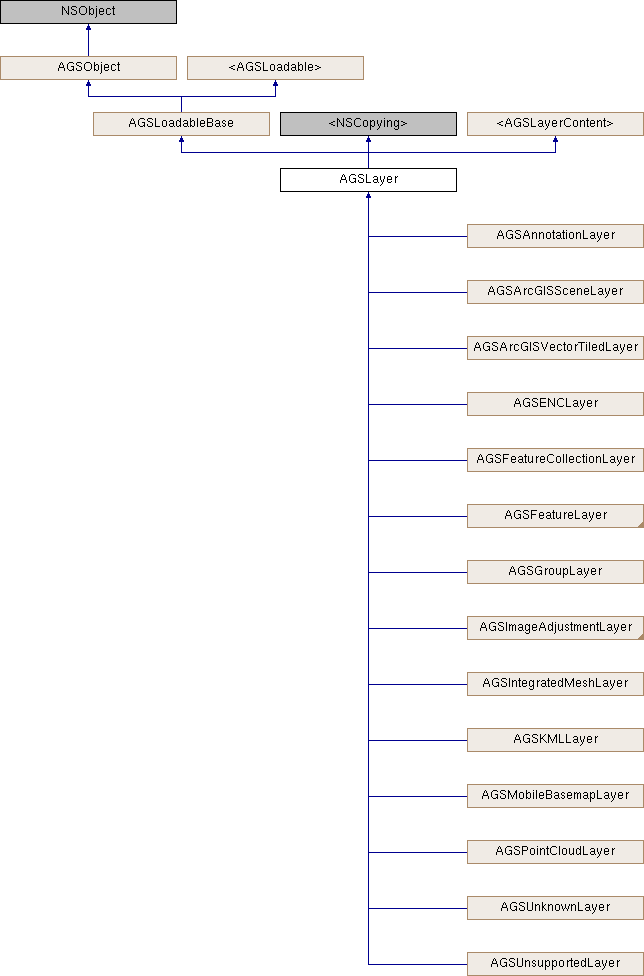
AGSLayer is the base class for all these layer types.
| Layer type | 2D/3D | Time-aware | Online/offline | Sources |
|---|---|---|---|---|
Annotation layer (AGSAnnotationLayer) | 2D | No | Both | ArcGIS feature service, portal item, mobile map package (.mmpk) |
ArcGIS map image layer (AGSArcGISMapImageLayer) | Both | Yes | Online | ArcGIS map service |
ArcGIS tiled layer (AGSArcGISTiledLayer) | Both | No | Both | ArcGIS tile service, tile package (.tpk/.tpkx) |
ArcGIS vector tiled layer (AGSArcGISVectorTiledLayer) | 2D | No | Both | ArcGIS vector tile service, vector tile package (.vtpk) |
Bing maps layer (AGSBingMapsLayer) | Both | No | Online | Bing maps |
ENC layer (AGSENCLayer) | 2D | No | Offline | ENC exchange set, ENC cell |
Feature collection layer (AGSFeatureCollectionLayer) | Both | No | Both | Portal item, web map, feature set / query result |
Feature layer (AGSFeatureLayer) | Both | Yes | Both | ArcGIS feature service, WFS, shapefile, GeoPackage, geodatabase |
Group layer (AGSGroupLayer) | Both | No | Both | Other layers and group layers |
KML layer (AGSKMLLayer) | Both | Yes | Both | KML file (.kml, .kmz) |
Mobile basemap layer (AGSMobileBasemapLayer) | 2D | No | Offline | Mobile map package (.mmpk) |
OpenStreetMap layer (AGSOpenStreetMapLayer) | Both | No | Online | OpenStreetMap.org |
Raster layer (AGSRasterLayer) | Both | Yes | Both | GeoPackage, raster file, ArcGIS Image service |
Scene layer (AGSArcGISSceneLayer) | 3D | No | Both | Scene service or scene package |
Subtype feature layer (AGSSubtypeFeatureLayer) | 2D | No | Both | ArcGIS feature service, geodatabase |
Web tiled layer (AGSWebTiledLayer) | Both | No | Online | Web tile service |
WMS layer (AGSWMSLayer) | Both | Yes | Online | WMS service |
WMTS layer (AGSWMTSLayer) | Both | No | Online | WMTS service |
- Since
- 100
Instance Methods | |
| (void) | - cancelLoad |
| (id< AGSCancelable >) | - fetchLegendInfosWithCompletion: |
| (BOOL) | - isEqualToLayer: |
| (BOOL) | - isVisibleAtScale: |
| (void) | - loadWithCompletion: |
| (void) | - retryLoadWithCompletion: |
Properties | |
| NSString * | attribution |
| BOOL | canChangeVisibility |
| AGSEnvelope * | fullExtent |
| BOOL | identifyEnabled |
| AGSItem * | item |
| NSString * | layerDescription |
| NSString * | layerID |
| NSError * | loadError |
| AGSLoadStatus | loadStatus |
| double | maxScale |
| double | minScale |
| NSString * | name |
| float | opacity |
| BOOL | showInLegend |
| AGSSpatialReference * | spatialReference |
| NSArray< id< AGSLayerContent > > * | subLayerContents |
| void(^ | subLayerContentsChangedHandler )(void) |
| BOOL | visible |
Method Documentation
§ cancelLoad()
|
requiredinherited |
Cancels loading if it is in progress, otherwise it does nothing. This should be called carefully because other objects could be waiting for loadWithCompletion: or retryLoadWithCompletion: to complete and this will call them all back with the error of NSUserCancelledError
- Since
- 100
§ fetchLegendInfosWithCompletion:()
| - (id<AGSCancelable>) fetchLegendInfosWithCompletion: | (void(^)(NSArray< AGSLegendInfo * > *__nullable legendInfos, NSError *__nullable error)) | completion |
Fetches the array of legend infos (AGSLegendInfo) for this layer.
- Since
- 100
§ isEqualToLayer:()
| - (BOOL) isEqualToLayer: | (AGSLayer *) | other |
§ isVisibleAtScale:()
| - (BOOL) isVisibleAtScale: | (double) | scale |
Check whether this layer is visible at a given scale.
- Since
- 100
§ loadWithCompletion:()
|
requiredinherited |
Loads data for the object asynchronously. The completion block is invoked upon completion.
You can call this method any number of times, however only one attempt is made to load the data. If it is already loading, it will just continue to load (i.e. not force a reload). If it has already loaded successfully, the completion block will be invoked right away. If it has already failed to load, the completion block will be invoked right away with error previously encountered. This method supports multiple callers and will call them all back on completion. However, each caller's completion block will be invoked once and only once.
- Parameters
-
completion block that is invoked when object loads successfully or fails to load. An error is passed to the block if the object fails to load.
- Note
- The completion block is always invoked on the main thread.
- Since
- 100
- See also
- cancelLoadto cancel loading-
- retryLoadWithCompletion:to force reload
§ retryLoadWithCompletion:()
|
requiredinherited |
Tries to reload when an object has failed to load. This method should be called judiciously. It should be called when:
- you didn't have network connectivity earlier when it failed and you want to retry now that you have connectivity
- the server was down earlier when it failed and you want to retry
- the request is taking too long and you want to cancel it and retry, in which case you will first call
cancelLoadand then this method
If the data hasn't started loading, it will start loading. If it is already loading, it will just continue to load. If it has already loaded successfully, calls back right away. If it has already failed to load, tries again. This method supports multiple callers and will call them all back on completion. However, each caller's completion block will be invoked once and only once.
- Parameters
-
completion block that is invoked when object loads successfully or fails to load. An error is passed to the block if the object fails to load.
- Note
- The completion block is always invoked on the main thread.
- Since
- 100
Property Documentation
§ attribution
|
readnonatomiccopy |
Attribution information of the layer
- Since
- 100
§ canChangeVisibility
|
readrequirednonatomicassigninherited |
Denotes whether the layer can change visibility or not.
- Since
- 100
§ fullExtent
|
readnonatomicstrong |
Full extent of the layer.
- Since
- 100
§ identifyEnabled
|
readnonatomicassign |
Specifies whether the layer supports identify.
- Since
- 100
§ item
|
readnonatomicstrong |
The item the layer has been created from.
- Since
- 100
§ layerDescription
|
readwritenonatomiccopy |
The layer's description
- Since
- 100
§ layerID
|
readwritenonatomiccopy |
The layer's ID specified in the web map item of ArcGIS Online or an on-premises portal.
- Since
- 100
§ loadError
|
readnonatomicstronginherited |
The error that was encountered during the most recent load operation. Will be nil if the operation succeeded.
- Since
- 100
§ loadStatus
|
readrequirednonatomicassigninherited |
Status of the load operation.
- Since
- 100
§ maxScale
|
readwritenonatomicassign |
The maximum scale at which this layer is visible. If the map or scene is zoomed in beyond this scale, the layer will not be visible. A value of 0 means there is no maximum scale threshold and the layer will be visible at the smallest scale available for the map or scene.
- Since
- 100
§ minScale
|
readwritenonatomicassign |
The minimum scale at which this layer is visible. If the map or scene is zoomed out beyond this scale, the layer will not be visible. A value of 0 means there is no minimum scale threshold and the layer will be visible at the largest scale available for the map or scene.
- Since
- 100
§ name
|
readwritenonatomiccopy |
The name of the layer
- Since
- 100
§ opacity
|
readwritenonatomicassign |
The opacity of this layer as a value between 0 (fully transparent) and 1 (fully opaque). Default value is 1.
- Since
- 100
§ showInLegend
|
readwritenonatomicassigninherited |
Indicates whether to show legend information.
- Since
- 100
§ spatialReference
|
readnonatomicstrong |
The spatial reference of the layer.
- Since
- 100
§ subLayerContents
|
readnonatomiccopyinherited |
This layer's sub-layers.
- Since
- 100
§ subLayerContentsChangedHandler
|
readwritenonatomiccopyinherited |
Block that is invoked when the sub layer contents changes.
- Note
- The block will be invoked on the same thread on which the event occured, which could be any arbitrary thread. You need to dispatch any UI related work to the main thread.
- Since
- 100
§ visible
|
readwritenonatomicassigninherited |
Denotes whether the layer is visible or not.
- Since
- 100