Description
A layer that can visualize KML data.
Keyhole Markup Language (KML) is a specification for working with geographic content. KML files can contain 2D and 3D content, as well as links to content from the network.
Functional characteristics KML represents features as a tree of nodes, including network links, folders, and place marks. Like ArcGIS features, place marks are defined with point, line, or polygon geometry. KML geometry, however, is always based on the WGS84 coordinate system. KML can also have attributes, but unlike ArcGIS feature services, a KML document does not use a schema to define a standard set of fields. ArcGIS Runtime supports version 2.2 of the KML specification as defined by the Open Geospatial Consortium (OGC).
Unique features of KML include network links and screen overlays. Network links are useful for retrieving network content on a specified interval—perfect for keeping a live map up to date. Network links can also be used to split a large KML file into multiple per-region KML files, with each being loaded only when the region is in view. Screen overlays can be used to show content, such as branding or a legend, on top of the view. Screen overlay content does not scroll with the map or react to user interaction.
Performance characteristics KML files can vary significantly in the features they use, including 3D models, network links, and refresh intervals. Not all features are supported in 2D and 3D. For example, 3D models only appear when the KML layer is shown in a scene. Many KML files consist solely of a pointer to another KML file and a refresh interval. For example, the National Weather Service distributes forecast maps in the United States this way.
- See also
AGSLayer, Sample: Display KML, Sample: Identify KML features, Sample: List KML contents
- License Restrictions:
- This feature requires a Standard license for production deployment when using local .kml or .kmz file . No license required in Developer mode for testing.
- Since
- 100.4
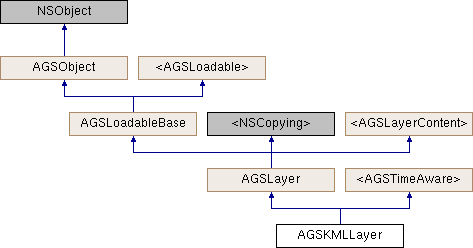
Instance Methods | |
| (void) | - cancelLoad |
| (id< AGSCancelable >) | - fetchLegendInfosWithCompletion: |
| (instancetype) | - initWithItem: |
| (instancetype) | - initWithKMLDataset: |
| (BOOL) | - isEqualToLayer: |
| (BOOL) | - isVisibleAtScale: |
| (void) | - loadWithCompletion: |
| (void) | - retryLoadWithCompletion: |
Class Methods | |
| (instancetype) | + KMLLayerWithItem: |
| (instancetype) | + KMLLayerWithKMLDataset: |
Properties | |
| NSString * | attribution |
| BOOL | canChangeVisibility |
| AGSKMLDataset * | dataset |
| AGSEnvelope * | fullExtent |
| AGSTimeExtent * | fullTimeExtent |
| BOOL | identifyEnabled |
| AGSItem * | item |
| NSString * | layerDescription |
| NSString * | layerID |
| NSError * | loadError |
| AGSLoadStatus | loadStatus |
| double | maxScale |
| double | minScale |
| NSString * | name |
| float | opacity |
| BOOL | showInLegend |
| AGSSpatialReference * | spatialReference |
| NSArray< id< AGSLayerContent > > * | subLayerContents |
| void(^ | subLayerContentsChangedHandler )(void) |
| BOOL | supportsTimeFiltering |
| BOOL | timeFilteringEnabled |
| AGSTimeValue * | timeInterval |
| AGSTimeValue * | timeOffset |
| BOOL | visible |
Method Documentation
§ cancelLoad()
|
requiredinherited |
Cancels loading if it is in progress, otherwise it does nothing. This should be called carefully because other objects could be waiting for loadWithCompletion: or retryLoadWithCompletion: to complete and this will call them all back with the error of NSUserCancelledError
- Since
- 100
§ fetchLegendInfosWithCompletion:()
| - (id<AGSCancelable>) fetchLegendInfosWithCompletion: | (void(^)(NSArray< AGSLegendInfo * > *__nullable legendInfos, NSError *__nullable error)) | completion |
Fetches the array of legend infos (AGSLegendInfo) for this layer.
- Since
- 100
§ initWithItem:()
| - (instancetype) initWithItem: | (AGSItem *) | item |
Initialize this layer with an item representing a KML file or link to a KML resource. The item's type should be AGSPortalItemTypeKML.
- Parameters
-
item representing a KML file or link to a KML resource.
- Returns
- A new kml layer
- Since
- 100.4
§ initWithKMLDataset:()
| - (instancetype) initWithKMLDataset: | (AGSKMLDataset *) | dataset |
Initialize this layer with a KML dataset.
- Parameters
-
The KML dataset.
- Returns
- A new kml layer
- Since
- 100.4
§ isEqualToLayer:()
| - (BOOL) isEqualToLayer: | (AGSLayer *) | other |
§ isVisibleAtScale:()
| - (BOOL) isVisibleAtScale: | (double) | scale |
Check whether this layer is visible at a given scale.
- Since
- 100
§ KMLLayerWithItem:()
| + (instancetype) KMLLayerWithItem: | (AGSItem *) | item |
Initialize this layer with an item representing a KML file or link to a KML resource. The item's type should be AGSPortalItemTypeKML.
- Parameters
-
item representing a KML file or link to a KML resource.
- Returns
- A new kml layer
- Since
- 100.4
§ KMLLayerWithKMLDataset:()
| + (instancetype) KMLLayerWithKMLDataset: | (AGSKMLDataset *) | dataset |
Initialize this layer with a KML dataset.
- Parameters
-
The KML dataset.
- Returns
- A new kml layer
- Since
- 100.4
§ loadWithCompletion:()
|
requiredinherited |
Loads data for the object asynchronously. The completion block is invoked upon completion.
You can call this method any number of times, however only one attempt is made to load the data. If it is already loading, it will just continue to load (i.e. not force a reload). If it has already loaded successfully, the completion block will be invoked right away. If it has already failed to load, the completion block will be invoked right away with error previously encountered. This method supports multiple callers and will call them all back on completion. However, each caller's completion block will be invoked once and only once.
- Parameters
-
completion block that is invoked when object loads successfully or fails to load. An error is passed to the block if the object fails to load.
- Note
- The completion block is always invoked on the main thread.
- Since
- 100
- See also
- cancelLoadto cancel loading-
- retryLoadWithCompletion:to force reload
§ retryLoadWithCompletion:()
|
requiredinherited |
Tries to reload when an object has failed to load. This method should be called judiciously. It should be called when:
- you didn't have network connectivity earlier when it failed and you want to retry now that you have connectivity
- the server was down earlier when it failed and you want to retry
- the request is taking too long and you want to cancel it and retry, in which case you will first call
cancelLoadand then this method
If the data hasn't started loading, it will start loading. If it is already loading, it will just continue to load. If it has already loaded successfully, calls back right away. If it has already failed to load, tries again. This method supports multiple callers and will call them all back on completion. However, each caller's completion block will be invoked once and only once.
- Parameters
-
completion block that is invoked when object loads successfully or fails to load. An error is passed to the block if the object fails to load.
- Note
- The completion block is always invoked on the main thread.
- Since
- 100
Property Documentation
§ attribution
|
readnonatomiccopyinherited |
Attribution information of the layer
- Since
- 100
§ canChangeVisibility
|
readrequirednonatomicassigninherited |
Denotes whether the layer can change visibility or not.
- Since
- 100
§ dataset
|
readnonatomicstrong |
The KML dataset used to create the layer.
- Since
- 100.4
§ fullExtent
|
readnonatomicstronginherited |
Full extent of the layer.
- Since
- 100
§ fullTimeExtent
|
readnonatomicstronginherited |
The full time extent of the layer 100.2
§ identifyEnabled
|
readnonatomicassigninherited |
Specifies whether the layer supports identify.
- Since
- 100
§ item
|
readnonatomicstronginherited |
The item the layer has been created from.
- Since
- 100
§ layerDescription
|
readwritenonatomiccopyinherited |
The layer's description
- Since
- 100
§ layerID
|
readwritenonatomiccopyinherited |
The layer's ID specified in the web map item of ArcGIS Online or an on-premises portal.
- Since
- 100
§ loadError
|
readnonatomicstronginherited |
The error that was encountered during the most recent load operation. Will be nil if the operation succeeded.
- Since
- 100
§ loadStatus
|
readrequirednonatomicassigninherited |
Status of the load operation.
- Since
- 100
§ maxScale
|
readwritenonatomicassigninherited |
The maximum scale at which this layer is visible. If the map or scene is zoomed in beyond this scale, the layer will not be visible. A value of 0 means there is no maximum scale threshold and the layer will be visible at the smallest scale available for the map or scene.
- Since
- 100
§ minScale
|
readwritenonatomicassigninherited |
The minimum scale at which this layer is visible. If the map or scene is zoomed out beyond this scale, the layer will not be visible. A value of 0 means there is no minimum scale threshold and the layer will be visible at the largest scale available for the map or scene.
- Since
- 100
§ name
|
readwritenonatomiccopyinherited |
The name of the layer
- Since
- 100
§ opacity
|
readwritenonatomicassigninherited |
The opacity of this layer as a value between 0 (fully transparent) and 1 (fully opaque). Default value is 1.
- Since
- 100
§ showInLegend
|
readwritenonatomicassigninherited |
Indicates whether to show legend information.
- Since
- 100
§ spatialReference
|
readnonatomicstronginherited |
The spatial reference of the layer.
- Since
- 100
§ subLayerContents
|
readnonatomiccopyinherited |
This layer's sub-layers.
- Since
- 100
§ subLayerContentsChangedHandler
|
readwritenonatomiccopyinherited |
Block that is invoked when the sub layer contents changes.
- Note
- The block will be invoked on the same thread on which the event occured, which could be any arbitrary thread. You need to dispatch any UI related work to the main thread.
- Since
- 100
§ supportsTimeFiltering
|
readnonatomicassigninherited |
Indicates whether the layer supports filtering its contents by a time range 100.2
§ timeFilteringEnabled
|
readwritenonatomicassigninherited |
Indicates whether the layer must use the time extent defined on the owning AGSGeoView::timeExtent and filter its content. Only applicable if the layer supports time filtering (see supportsTimeFiltering) 100.2
§ timeInterval
|
readnonatomicstronginherited |
Returns the suggested time slider step size for this time aware layer. Can be nil if no time interval is suggested for this time aware object.
100.2
§ timeOffset
|
readwritenonatomicstronginherited |
A time offset for this layer. This is useful when data from different layers belong to different time periods and must be displayed together. The offset it applied on-the-fly, it does not change the actual data of the layer. The time offset is subtracted from the time extent set on the owning AGSGeoView::timeExtent before the extent is used to filter content from the layer. 100.2
§ visible
|
readwritenonatomicassigninherited |
Denotes whether the layer is visible or not.
- Since
- 100