Description
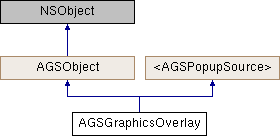
An overlay to display graphics on the map.
Instances of this class represent a graphics overlay that can display graphics on top of a map. Graphics may represent temporary data in your application, such as the results of a query or an analysis, or may be used to highlight existing content in the map.
Each graphic contains a geometry describing the location and the shape of the graphic. A graphics overlay typically contains graphics based on a single geometry type (Point, Multipoint, Polyline, or Polygon). Each graphic can be associated with an AGSSymbol which controls how the graphic looks. Alternatively, the overlay can be associated with an AGSRenderer which manages the appearance of all graphics in the layer.
- Since
- 100
Instance Methods | |
| (void) | - clearSelection |
| (NSArray< AGSGraphic * > *) | - selectedGraphics |
| (void) | - selectGraphics: |
| (void) | - unselectGraphics: |
Class Methods | |
| (instancetype) | + graphicsOverlay |
Properties | |
| AGSEnvelope * | extent |
| NSMutableArray< AGSGraphic * > * | graphics |
| NSMutableArray< AGSLabelDefinition * > * | labelDefinitions |
| BOOL | labelsEnabled |
| double | maxScale |
| double | minScale |
| float | opacity |
| NSString * | overlayID |
| AGSPopupDefinition * | popupDefinition |
| BOOL | popupEnabled |
| AGSRenderer * | renderer |
| AGSGraphicsRenderingMode | renderingMode |
| BOOL | scaleSymbols |
| AGSLayerSceneProperties * | sceneProperties |
| AGSColor * | selectionColor |
| BOOL | visible |
Method Documentation
§ clearSelection()
| - (void) clearSelection |
Clears selection on all graphics
- Since
- 100
§ graphicsOverlay()
| + (instancetype) graphicsOverlay |
Initializes an AGSGraphicsOverlay.
- Since
- 100
§ selectedGraphics()
| - (NSArray<AGSGraphic*>*) selectedGraphics |
An array of AGSGraphic objects representing graphics that have selection enabled Graphics with selection enabled will be drawn using selectionColor.
- Since
- 100
§ selectGraphics:()
| - (void) selectGraphics: | (NSArray< AGSGraphic * > *) | graphics |
Select the specified graphics. The map or scene will be updated to render the graphics with selectionColor
- Parameters
-
graphics to select
- Since
- 100
§ unselectGraphics:()
| - (void) unselectGraphics: | (NSArray< AGSGraphic * > *) | graphics |
Disable selection on the specified graphics. The map or scene will be redrawn to reflect the change.
- Parameters
-
graphics to unselect
- Since
- 100
Property Documentation
§ extent
|
readnonatomicstrong |
The extent of the graphics overlay.
- Since
- 100
§ graphics
|
readnonatomicstrong |
The list of graphics in the graphics overlay.
- Note
- This array does not allow duplicate objects.
- Since
- 100
§ labelDefinitions
|
readnonatomicstrong |
Defines how labels should be displayed.
- Since
- 100.1
§ labelsEnabled
|
readwritenonatomicassign |
Indicates whether or not graphics in this overlay will be labelled.
- Since
- 100.1
§ maxScale
|
readwritenonatomicassign |
The maximum scale at which this overlay is visible. If the map or scene is zoomed in beyond this scale, the overlay will not be visible. A value of 0 means there is no maximum scale threshold and the overlay will be visible at the smallest scale available for the map or scene.
- Since
- 100
§ minScale
|
readwritenonatomicassign |
The minimum scale at which this overlay is visible. If the map or scene is zoomed out beyond this scale, the overlay will not be visible. A value of 0 means there is no minimum scale threshold and the overlay will be visible at the largest scale available for the map or scene.
- Since
- 100
§ opacity
|
readwritenonatomicassign |
The opacity of content in this overlay. Default value is 1 (fully opaque). Permitted values are between 0-1 (inclusive)
- Since
- 100
§ overlayID
|
readwritenonatomiccopy |
Identifier for this overlay. Defaults to an empty string. Does not need to be unique.
- Since
- 100.2
§ popupDefinition
|
readwritenonatomicstronginherited |
The AGSPopupDefinition associated with the popup source. nil if an error occurs or if the popup source is not associated with a pop-up definition.
- Since
- 100
§ popupEnabled
|
readwriterequirednonatomicassigninherited |
Indicates whether popups are enabled on this source.
- Since
- 100
§ renderer
|
readwritenonatomicstrong |
The renderer assigned to the overaly which is responsible for symbolizing the graphics. It is optional as each graphic may have it's own symbol. If a graphic has a symbol, that will be used for drawing the graphic instead of the renderer.
- Since
- 100
§ renderingMode
|
readwritenonatomicassign |
The rendering mode of the graphics. Default is AGSGraphicsRenderingModeDynamic
- Since
- 100
§ scaleSymbols
|
readwritenonatomicassign |
Whether the overlay's symbols and labels honor the AGSMap reference scale when displayed in an AGSMapView. If the AGSMap has a positive reference scale, and the overlay honors it, then symbols and labels will be drawn at their specified size when the viewing scale is the same as the reference scale, and will grow or shrink as the view zooms in or out, to keep the symbol a fixed size on the map. If the AGSMap has no reference scale, the reference scale is zero or the AGSGraphicOverlay::scaleSymbols property is NO, then the symbols and labels will be drawn at their fixed screen size. AGSGraphicOverlay::scaleSymbols can only be used when displaying the overlay in an AGSMapView. The symbols and labels will be displayed at fixed screen size in a AGSSceneView. The default value is NO.
- Since
- 100.7
§ sceneProperties
|
readwritenonatomicstrong |
Properties to apply only when rendering data in 3D scenes using AGSSceneView
- Since
- 100.2
§ selectionColor
|
readwritenonatomicstrong |
The color to use for drawing a halo around selected graphics. Default is cyan.
- Since
- 100
- Deprecated:
- 100.4 Use
colorproperty exposed throughAGSGeoView::selectionProperties
§ visible
|
readwritenonatomicassign |
Indicates whether this overlay is visible on the map or not.
- Since
- 100