Description
A layer that can visualize vector/feature data.
Feature layers display data from feature services or supported local data sources, including shapefiles, GeoPackages, and geodatabases. Feature layers can be used to display, select, and query features in a layer. If the underlying feature service or table supports editing, you can use it with a feature layer as a basis for editing geometry, attributes, and attachments. Feature layers are used to store features associated with a utility network.
To display features in an AGSFeatureCollectionTable, use AGSFeatureCollectionLayer instead.
Features are retrieved as needed by the app. Features can be downloaded from a sync-enabled feature service when the device is connected and cached locally for use when the device is offline. Edits can then be synchronized back to the service.
Functional characteristics The following are sources that can be rendered using a feature layer.
Feature service — Backed by a service feature table; feature data from the service is cached locally in the table. New features are retrieved automatically when you navigate the map. The local table cache is discarded when the layer is disposed. If sync is enabled, features can be created, edited, and pushed to the server.
Geodatabase — Backed by a geodatabase feature table; The geodatabase can be a replica of a feature service, which allows synchronizing with a feature service, or taking the content of a feature service offline. Use a geodatabase sync task to synchronize the geodatabase with the service.
Shapefile — Backed by a shapefile feature table; use a feature layer to show the contents of shapefiles (.shp).
Geopackage — Backed by a geopackage feature table; use a feature layer to render the tables in a GeoPackage (.gpkg). A GeoPackage is a data source that conforms to the OGC GeoPackage specification. Geopackage feature tables can be edited and saved, but can't support sync, because there is no backing feature service. ArcGIS Runtime supports GeoPackage versions 1.0, 1.1, and 1.2.
Web Feature Service (WFS) — Backed by a WFS feature table. You can populate the table using Runtime query parameters or raw XML-encoded GetFeature queries. A WFS feature table only supports manual cache feature request mode. Runtime supports OGC WFS versions 2.0.0 and 2.0.2.
WFS server implementations are inconsistent in how they expect coordinates to be formatted. Some return and expect coordinates in (x,y) order, while others expect (y,x). Runtime guesses the correct order by default. This behavior can be configured with the AGSWFSFeatureTable::axisOrder and AGSWFSFeatureTable::filterAxisOrder properties.
Individual features can be queried and filtered based on spatial queries or SQL queries. Introduced at 100.3.0, string comparisons for features queried in service feature tables are case insensitive.
Local tables cannot be re-projected automatically.
Feature layers expose an AGSFeatureLayer::unsupportedJSON property that, for feature layers based on a feature service, returns a dictionary of values known to the supported web map specification but not explicitly exposed through the Runtime API. This allows you to access information that was saved with the layer but not used by Runtime. Feature layers also provide an AGSFeatureLayer::unknownJSON property to return JSON that was not recognized.
Performance characteristics As full feature information is cached locally in a geodatabase, shapefile, or GeoPackage, and features are drawn natively, this layer type offers excellent display performance when zooming and panning the map within the extent of cached features. Querying features is also efficient, enabling app functions such as real-time updates of query results in a map.
The local cache must be initially created, which can be resource-intensive for the server. The initial download to the device may require extensive network usage and subsequent local device storage. App memory increases with the number and complexity of the features cached. Network usage can be eliminated by provisioning the cache directly to the device in advance.
Feature tables backed by a service define three feature request modes. The table's feature request mode controls how and when features are requested from the service.
On interaction cache — Features are requested automatically for the visible map or scene extent. As the user pans and zooms, features are cached locally. If the user returns to an area where features have already been loaded, the table won't need to download those features again.
Manual cache — Features must be manually populated using a call to AGSServiceFeatureTable::populateFromServiceWithParameters:clearCache:outfields:completion:. Once populated, all queries are made against the local table only. AGSServiceFeatureTable::populateFromServiceWithParameters:clearCache:outfields:completion: can be called again to retrieve more features from the service.
On interaction, no cache — Features are requested automatically for the visible map extent. As the user pans and zooms, features outside the visible extent are not cached and must be downloaded again each time.
- See also
AGSLayer, Sample: Feature layer (geodatabase), Sample: Feature layer query, Sample: Feature layer (shapefile), Sample: Feature layer (feature service), Sample: Service feature table (manual cache)
- Since
- 100
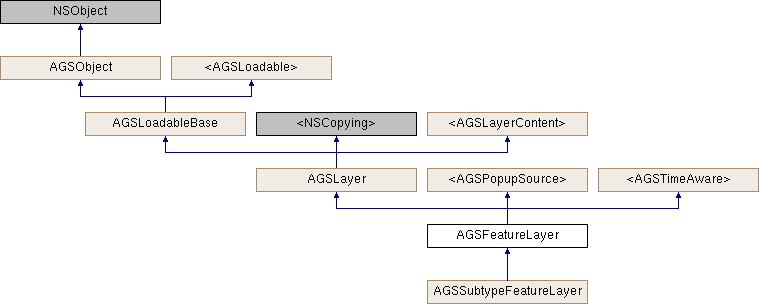
Instance Methods | |
| (void) | - cancelLoad |
| (void) | - clearSelection |
| (id< AGSCancelable >) | - fetchLegendInfosWithCompletion: |
| (id< AGSCancelable >) | - getSelectedFeaturesWithCompletion: |
| (instancetype) | - init |
| (instancetype) | - initWithFeatureTable: |
| (instancetype) | - initWithItem:layerID: |
| (BOOL) | - isEqualToLayer: |
| (BOOL) | - isVisibleAtScale: |
| (void) | - loadWithCompletion: |
| (void) | - resetFeaturesVisible |
| (void) | - resetRenderer |
| (void) | - retryLoadWithCompletion: |
| (void) | - selectFeature: |
| (void) | - selectFeatures: |
| (id< AGSCancelable >) | - selectFeaturesWithQuery:mode:completion: |
| (void) | - setFeature:visible: |
| (void) | - setFeatures:visible: |
| (void) | - unselectFeature: |
| (void) | - unselectFeatures: |
Class Methods | |
| (instancetype) | + featureLayer |
| (instancetype) | + featureLayerWithFeatureTable: |
| (instancetype) | + featureLayerWithItem:layerID: |
Method Documentation
§ cancelLoad()
|
requiredinherited |
Cancels loading if it is in progress, otherwise it does nothing. This should be called carefully because other objects could be waiting for loadWithCompletion: or retryLoadWithCompletion: to complete and this will call them all back with the error of NSUserCancelledError
- Since
- 100
§ clearSelection()
| - (void) clearSelection |
Clears selection on all features.
- Since
- 100
§ featureLayer()
| + (instancetype) featureLayer |
Initialize a new feature layer
- Returns
- A new initialized feature layer
- Since
- 100
- Deprecated:
- 100.1. Use
featureLayerWithFeatureTable:orfeatureLayerWithItem:layerID:instead.
§ featureLayerWithFeatureTable:()
| + (instancetype) featureLayerWithFeatureTable: | (AGSFeatureTable *) | featureTable |
Initialize the layer with the given AGSFeatureTable
- Parameters
-
featureTable The backing dataset whose features need to be drawn on the map by this layer.
- Since
- 100
§ featureLayerWithItem:layerID:()
| + (instancetype) featureLayerWithItem: | (AGSItem *) | item | |
| layerID: | (NSInteger) | layerID | |
Initialize the layer with the provided information
- Parameters
-
item representing an ArcGIS Feature Serivce. The item's type must be AGSPortalItemTypeFeatureService.layerID ID of an individual layer in the ArcGIS Feature service represented by the item
- Returns
- Initialized layer
- Since
- 100
§ fetchLegendInfosWithCompletion:()
| - (id<AGSCancelable>) fetchLegendInfosWithCompletion: | (void(^)(NSArray< AGSLegendInfo * > *__nullable legendInfos, NSError *__nullable error)) | completion |
Fetches the array of legend infos (AGSLegendInfo) for this layer.
- Since
- 100
§ getSelectedFeaturesWithCompletion:()
| - (id<AGSCancelable>) getSelectedFeaturesWithCompletion: | (void(^)(AGSFeatureQueryResult *__nullable featureQueryResult, NSError *__nullable error)) | completion |
Retrieve the list of features that have selection enabled.
- Parameters
-
completion block that is invoked with the results, or an error if one is encountered.
- Returns
- operation which can be canceled
- Since
- 100
§ init()
| - (instancetype) init |
Initialize a new feature layer
- Returns
- A new initialized feature layer
- Since
- 100
- Deprecated:
- 100.1. Use
initWithFeatureTable:orinitWithItem:layerID:instead.
§ initWithFeatureTable:()
| - (instancetype) initWithFeatureTable: | (AGSFeatureTable *) | featureTable |
Initialize the layer with the given AGSFeatureTable
- Parameters
-
featureTable The backing dataset whose features need to be drawn on the map by this layer.
- Since
- 100
§ initWithItem:layerID:()
| - (instancetype) initWithItem: | (AGSItem *) | item | |
| layerID: | (NSInteger) | layerID | |
Initialize the layer with the provided information
- Parameters
-
item representing an ArcGIS Feature Serivce. The item's type must be AGSPortalItemTypeFeatureService.layerID ID of an individual layer in the ArcGIS Feature service represented by the item
- Returns
- Initialized layer
- Since
- 100
§ isEqualToLayer:()
| - (BOOL) isEqualToLayer: | (AGSLayer *) | other |
§ isVisibleAtScale:()
| - (BOOL) isVisibleAtScale: | (double) | scale |
Check whether this layer is visible at a given scale.
- Since
- 100
§ loadWithCompletion:()
|
requiredinherited |
Loads data for the object asynchronously. The completion block is invoked upon completion.
You can call this method any number of times, however only one attempt is made to load the data. If it is already loading, it will just continue to load (i.e. not force a reload). If it has already loaded successfully, the completion block will be invoked right away. If it has already failed to load, the completion block will be invoked right away with error previously encountered. This method supports multiple callers and will call them all back on completion. However, each caller's completion block will be invoked once and only once.
- Parameters
-
completion block that is invoked when object loads successfully or fails to load. An error is passed to the block if the object fails to load.
- Note
- The completion block is always invoked on the main thread.
- Since
- 100
- See also
- cancelLoadto cancel loading-
- retryLoadWithCompletion:to force reload
§ resetFeaturesVisible()
| - (void) resetFeaturesVisible |
Reset the visibility of all features back to their original state
- Since
- 100
§ resetRenderer()
| - (void) resetRenderer |
Reset the renderer back to the original renderer provided by the featureTable. This is useful if you, for instance, change the renderer and then want to revert back to the original.
- Since
- 100
§ retryLoadWithCompletion:()
|
requiredinherited |
Tries to reload when an object has failed to load. This method should be called judiciously. It should be called when:
- you didn't have network connectivity earlier when it failed and you want to retry now that you have connectivity
- the server was down earlier when it failed and you want to retry
- the request is taking too long and you want to cancel it and retry, in which case you will first call
cancelLoadand then this method
If the data hasn't started loading, it will start loading. If it is already loading, it will just continue to load. If it has already loaded successfully, calls back right away. If it has already failed to load, tries again. This method supports multiple callers and will call them all back on completion. However, each caller's completion block will be invoked once and only once.
- Parameters
-
completion block that is invoked when object loads successfully or fails to load. An error is passed to the block if the object fails to load.
- Note
- The completion block is always invoked on the main thread.
- Since
- 100
§ selectFeature:()
| - (void) selectFeature: | (AGSFeature *) | feature |
Select the specified feature. The map or scene will be updated to render the feature with selectionColor
- Parameters
-
feature to select
- Since
- 100
- See also
selectionColor
- Note
- Use
selectFeatures:to enable selection on a group of features together. It provides better performance as the map will only need to be updated once.
§ selectFeatures:()
| - (void) selectFeatures: | (NSArray< AGSFeature * > *) | features |
Select the specified features. The map or scene will be updated to highlight the features with selectionColor (cyan by default).
- Parameters
-
features to select
- Since
- 100
- See also
selectionColor
§ selectFeaturesWithQuery:mode:completion:()
| - (id<AGSCancelable>) selectFeaturesWithQuery: | (AGSQueryParameters *) | parameters | |
| mode: | (AGSSelectionMode) | mode | |
| completion: | (nullable void(^)(AGSFeatureQueryResult *__nullable featureQueryResult, NSError *__nullable error)) | completion | |
Select features that match the query criteria. The map or scene will be updated to highlight the features with selectionColor (cyan by default).
- Parameters
-
parameters defining which features should be considered mode defining how selection needs to be applied to the features completion block that is invoked with the results, or an error if one is encountered.
- Returns
- operation which can be canceled
- Since
- 100
§ setFeature:visible:()
| - (void) setFeature: | (AGSFeature *) | feature | |
| visible: | (BOOL) | visible | |
Change the visibility of the specified feature. The map or scene is redrawn to reflect the change.
- Parameters
-
feature to change visible If true, feature is made visible. If false, feature is hidden
- Since
- 100
- Note
- Use
setFeatures:visible:to change the visibility of a group of features together. It provides better performance as the map will only need to be updated once.
§ setFeatures:visible:()
| - (void) setFeatures: | (NSArray< AGSFeature * > *) | features | |
| visible: | (BOOL) | visible | |
Change the visibility of the specified features. The map or scene is updated to reflect the change.
- Parameters
-
features to change visible If true, features are made visible. If false, features are hidden
- Since
- 100
§ unselectFeature:()
| - (void) unselectFeature: | (AGSFeature *) | feature |
Clear selection on the specified feature. The map or scene will be redrawn to reflect the change.
- Parameters
-
feature to unselect
- Since
- 100
- Note
- Use
unselectFeatures:to disable selection on a group of features together. It provides better performance as the map will only need to be updated once.
§ unselectFeatures:()
| - (void) unselectFeatures: | (NSArray< AGSFeature * > *) | features |
Clear selection on the specified features. The map or scene will be redrawn to reflect the change.
- Parameters
-
features to unselect
- Since
- 100
Property Documentation
§ attribution
|
readnonatomiccopyinherited |
Attribution information of the layer
- Since
- 100
§ canChangeVisibility
|
readrequirednonatomicassigninherited |
Denotes whether the layer can change visibility or not.
- Since
- 100
§ definitionExpression
|
readwritenonatomiccopy |
An expression which is a SQL statement where clause to filter out the features to be displayed. The definition expression string uses the SQL-92 where clause syntax (https://en.wikipedia.org/wiki/SQL-92). Be sure to escape special characters in the expression string as required for your platform. The DATE keyword expects the date format yyyy-mm-dd and the TIMESTAMP keyword expects the time stamp format yyyy-mm-dd hh:mm:ss. See the ArcGIS Blog article entitled "Querying Feature Services Date-Time Queries" (https://www.esri.com/arcgis-blog/products/api-rest/data-management/querying-feature-services-date-time-queries/) for more information.
- Since
- 100
§ featureTable
|
readnonatomicstrong |
The backing dataset whose features are drawn on the map by this layer.
- Since
- 100
§ fullExtent
|
readnonatomicstronginherited |
Full extent of the layer.
- Since
- 100
§ fullTimeExtent
|
readnonatomicstronginherited |
The full time extent of the layer 100.2
§ identifyEnabled
|
readnonatomicassigninherited |
Specifies whether the layer supports identify.
- Since
- 100
§ item
|
readnonatomicstronginherited |
The item the layer has been created from.
- Since
- 100
§ labelDefinitions
|
readnonatomicstrong |
Defines how labels should be displayed.
- Since
- 100.1
§ labelsEnabled
|
readwritenonatomicassign |
Indicates whether or not features will be labelled on this layer.
- Since
- 100
§ layerDescription
|
readwritenonatomiccopyinherited |
The layer's description
- Since
- 100
§ layerID
|
readwritenonatomiccopyinherited |
The layer's ID specified in the web map item of ArcGIS Online or an on-premises portal.
- Since
- 100
§ loadError
|
readnonatomicstronginherited |
The error that was encountered during the most recent load operation. Will be nil if the operation succeeded.
- Since
- 100
§ loadStatus
|
readrequirednonatomicassigninherited |
Status of the load operation.
- Since
- 100
§ maxScale
|
readwritenonatomicassigninherited |
The maximum scale at which this layer is visible. If the map or scene is zoomed in beyond this scale, the layer will not be visible. A value of 0 means there is no maximum scale threshold and the layer will be visible at the smallest scale available for the map or scene.
- Since
- 100
§ minScale
|
readwritenonatomicassigninherited |
The minimum scale at which this layer is visible. If the map or scene is zoomed out beyond this scale, the layer will not be visible. A value of 0 means there is no minimum scale threshold and the layer will be visible at the largest scale available for the map or scene.
- Since
- 100
§ name
|
readwritenonatomiccopyinherited |
The name of the layer
- Since
- 100
§ opacity
|
readwritenonatomicassigninherited |
The opacity of this layer as a value between 0 (fully transparent) and 1 (fully opaque). Default value is 1.
- Since
- 100
§ popupDefinition
|
readwritenonatomicstronginherited |
The AGSPopupDefinition associated with the popup source. nil if an error occurs or if the popup source is not associated with a pop-up definition.
- Since
- 100
§ popupEnabled
|
readwriterequirednonatomicassigninherited |
Indicates whether popups are enabled on this source.
- Since
- 100
§ refreshInterval
|
readwritenonatomicassign |
Time interval (in seconds) specifying how often the layer should auto-refresh its contents. If 0 or less is specified, the layer will not auto-refresh.
- Since
- 100.1
§ renderer
|
readwritenonatomicstrong |
The renderer specifying how the features should be symbolized
- Since
- 100
§ renderingMode
|
readwritenonatomicassign |
Mode used for rendering this layer. Static mode is better suited for displaying large datasets (in terms of number of vertices) and for complex symbology because it does not update the layer's display while pan/zoom operations are in progress. Dynamic mode is better suited for smaller datasets that are updating frequently or for more interactive experience as the layer's display is updated continuously while pan/zoom operations are in progress.
- Since
- 100.2
- See also
AGSLoadSettingsto specify rendering mode for all feature layers in a map or scene
§ scaleSymbols
|
readwritenonatomicassign |
Whether the layer's symbols and labels honor the Map reference scale. If the Map has a positive reference scale, and the layer honors it, then symbols and labels will be drawn at their specified size when the viewing scale is the same as the reference scale, and will grow or shrink as the view zooms in or out, to keep the symbol a fixed size on the map. If the Map has no reference scale, the reference scale is zero or the FeatureLayer's scaleSymbols property is false, then the symbols and labels will be drawn at their fixed screen size.
- Since
- 100.5
§ sceneProperties
|
readwritenonatomicstrong |
Properties to apply only when rendering data in 3D scenes using AGSSceneView
- Since
- 100.2
§ selectionColor
|
readwritenonatomicstrong |
The color to use for drawing a halo around selected features. Defaults to cyan color.
- Since
- 100
- Deprecated:
- 100.4 Use
colorproperty exposed throughAGSGeoView::selectionProperties
§ selectionWidth
|
readwritenonatomicassign |
The width (in points) of the selection halo
- Since
- 100
- Deprecated:
- 100.4 This property will be removed in a future version
§ showInLegend
|
readwritenonatomicassigninherited |
Indicates whether to show legend information.
- Since
- 100
§ spatialReference
|
readnonatomicstronginherited |
The spatial reference of the layer.
- Since
- 100
§ subLayerContents
|
readnonatomiccopyinherited |
This layer's sub-layers.
- Since
- 100
§ subLayerContentsChangedHandler
|
readwritenonatomiccopyinherited |
Block that is invoked when the sub layer contents changes.
- Note
- The block will be invoked on the same thread on which the event occured, which could be any arbitrary thread. You need to dispatch any UI related work to the main thread.
- Since
- 100
§ supportsTimeFiltering
|
readnonatomicassigninherited |
Indicates whether the layer supports filtering its contents by a time range 100.2
§ timeFilteringEnabled
|
readwritenonatomicassigninherited |
Indicates whether the layer must use the time extent defined on the owning AGSGeoView::timeExtent and filter its content. Only applicable if the layer supports time filtering (see supportsTimeFiltering) 100.2
§ timeInterval
|
readnonatomicstronginherited |
Returns the suggested time slider step size for this time aware layer. Can be nil if no time interval is suggested for this time aware object.
100.2
§ timeOffset
|
readwritenonatomicstronginherited |
A time offset for this layer. This is useful when data from different layers belong to different time periods and must be displayed together. The offset it applied on-the-fly, it does not change the actual data of the layer. The time offset is subtracted from the time extent set on the owning AGSGeoView::timeExtent before the extent is used to filter content from the layer. 100.2
§ unknownJSON
|
readnonatomiccopy |
Unknown data from the source JSON. Unknown JSON is a dictionary of values that was in the source JSON but was not parsed by the Runtime.
- See also
NSDictionary
- Since
- 100.7
§ unsupportedJSON
|
readnonatomiccopy |
Unsupported data from the source JSON. Unsupported JSON is a dictionary of values that are supported by web maps, but not exposed through the native Runtime API
- See also
NSDictionary
- Since
- 100.7
§ visible
|
readwritenonatomicassigninherited |
Denotes whether the layer is visible or not.
- Since
- 100