Description
A task to export and download tile packages.
Instances of this class represent a task that can be used to download tiles (as a tile package, .tpk file) from supporting tiled ArcGIS Map or Image services. The service could be hosted in the cloud on ArcGIS Online or on-premises with ArcGIS server.
- Since
- 100
- See also
AGSTileCache
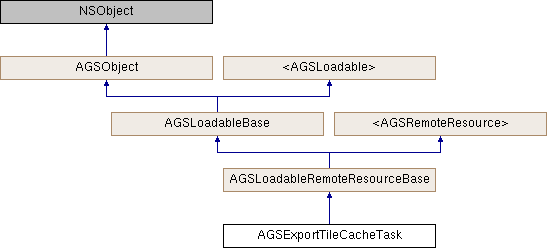
Instance Methods | |
| (void) | - cancelLoad |
| (AGSEstimateTileCacheSizeJob *) | - estimateTileCacheSizeJobWithParameters: |
| (AGSExportTileCacheJob *) | - exportTileCacheJobWithParameters:downloadFileURL: |
| (id< AGSCancelable >) | - exportTileCacheParametersWithAreaOfInterest:minScale:maxScale:completion: |
| (instancetype) | - initWithURL: |
| (void) | - loadWithCompletion: |
| (void) | - retryLoadWithCompletion: |
Class Methods | |
| (instancetype) | + exportTileCacheTaskWithURL: |
Properties | |
| AGSCredential * | credential |
| NSError * | loadError |
| AGSLoadStatus | loadStatus |
| AGSArcGISMapServiceInfo * | mapServiceInfo |
| AGSRequestConfiguration * | requestConfiguration |
| NSURL * | URL |
Method Documentation
§ cancelLoad()
|
requiredinherited |
Cancels loading if it is in progress, otherwise it does nothing. This should be called carefully because other objects could be waiting for loadWithCompletion: or retryLoadWithCompletion: to complete and this will call them all back with the error of NSUserCancelledError
- Since
- 100
§ estimateTileCacheSizeJobWithParameters:()
| - (AGSEstimateTileCacheSizeJob*) estimateTileCacheSizeJobWithParameters: | (AGSExportTileCacheParameters *) | parameters |
Returns a job which can be used to get a size estimate of the tile package contaning tiles specified by the parameters. The result of the job will be of type AGSEstimateTileCacheSizeResult.
- Note
- The job is dormant and needs to be explicitly started using
startWithStatusHandler:completion: (AGSEstimateTileCacheSizeJob)
- Parameters
-
parameters specifying which tiles to include in the tile package
- Returns
- job representing the progress on the server. The result of the job will be of type
AGSEstimateTileCacheSizeResult
- Since
- 100
§ exportTileCacheJobWithParameters:downloadFileURL:()
| - (AGSExportTileCacheJob*) exportTileCacheJobWithParameters: | (AGSExportTileCacheParameters *) | parameters | |
| downloadFileURL: | (NSURL *) | downloadFileURL | |
Returns a job which can be used to generate and download a tile package containing tiles specified by the parameters. The result of the job will be of type AGSTileCache
- Note
- The job is dormant and needs to be explicitly started using
startWithStatusHandler:completion: (AGSExportTileCacheJob)
- Parameters
-
parameters specifying which tiles to include in the tile package downloadFileURL where the tile package should be saved on disk, including the desired file name ending with the .tpk file extension.
- Returns
- job representing the progress on the server. The result of the job will be of type
AGSTileCache
- Since
- 100
§ exportTileCacheParametersWithAreaOfInterest:minScale:maxScale:completion:()
| - (id<AGSCancelable>) exportTileCacheParametersWithAreaOfInterest: | (AGSGeometry *) | areaOfInterest | |
| minScale: | (double) | minScale | |
| maxScale: | (double) | maxScale | |
| completion: | (void(^)(AGSExportTileCacheParameters *__nullable exportTileCacheParameters, NSError *__nullable error)) | completion | |
A convenience method to get properly initialized parameters for exporting tiles. It will calculate the levels of detail (LODs) required based on the specified min and max scale and the tiling scheme of the service.
- Parameters
-
areaOfInterest A polygon or envelope geometry representing the geographic area for which tiles are needed. Point and Polyline geometries are not supported minScale The minimum map scale for which tiles are needed. There won't be any tiles when the map is zoomed out beyond this scale. maxScale The maximum map scale for which tiles are needed. There won't be any tiles when the map is zoomed in beyond this scale. completion block that is invoked when the operation is complete with either the results or an error.
- Returns
- operation which can be canceled
- Since
- 100
§ exportTileCacheTaskWithURL:()
| + (instancetype) exportTileCacheTaskWithURL: | (NSURL *) | URL |
Initialize the task with a URL to a tiled ArcGIS Map or Image service
- Parameters
-
URL to a tiled ArcGIS Map or Image service
- Returns
- initialized task
- Since
- 100
§ initWithURL:()
| - (instancetype) initWithURL: | (NSURL *) | URL |
Initialize the task with a URL to a tiled ArcGIS Map or Image service
- Parameters
-
URL to a tiled ArcGIS Map or Image service
- Returns
- initialized task
- Since
- 100
§ loadWithCompletion:()
|
requiredinherited |
Loads data for the object asynchronously. The completion block is invoked upon completion.
You can call this method any number of times, however only one attempt is made to load the data. If it is already loading, it will just continue to load (i.e. not force a reload). If it has already loaded successfully, the completion block will be invoked right away. If it has already failed to load, the completion block will be invoked right away with error previously encountered. This method supports multiple callers and will call them all back on completion. However, each caller's completion block will be invoked once and only once.
- Parameters
-
completion block that is invoked when object loads successfully or fails to load. An error is passed to the block if the object fails to load.
- Note
- The completion block is always invoked on the main thread.
- Since
- 100
- See also
- cancelLoadto cancel loading-
- retryLoadWithCompletion:to force reload
§ retryLoadWithCompletion:()
|
requiredinherited |
Tries to reload when an object has failed to load. This method should be called judiciously. It should be called when:
- you didn't have network connectivity earlier when it failed and you want to retry now that you have connectivity
- the server was down earlier when it failed and you want to retry
- the request is taking too long and you want to cancel it and retry, in which case you will first call
cancelLoadand then this method
If the data hasn't started loading, it will start loading. If it is already loading, it will just continue to load. If it has already loaded successfully, calls back right away. If it has already failed to load, tries again. This method supports multiple callers and will call them all back on completion. However, each caller's completion block will be invoked once and only once.
- Parameters
-
completion block that is invoked when object loads successfully or fails to load. An error is passed to the block if the object fails to load.
- Note
- The completion block is always invoked on the main thread.
- Since
- 100
Property Documentation
§ credential
|
readwritenonatomicstronginherited |
Security credentials to access the remote resource. Only applicable if the resource is secured.
- Since
- 100
§ loadError
|
readnonatomicstronginherited |
The error that was encountered during the most recent load operation. Will be nil if the operation succeeded.
- Since
- 100
§ loadStatus
|
readrequirednonatomicassigninherited |
Status of the load operation.
- Since
- 100
§ mapServiceInfo
|
readnonatomicstrong |
Metadata about the ArcGIS Map service that the task is using
- Since
- 100
§ requestConfiguration
|
readwritenonatomicstronginherited |
The AGSRequestConfiguration object which defines the behavior and policies to use when accessing the remote resource. The default will be nil. If it is nil the [AGSRequestConfiguration globalConfiguration] will be used.
- Since
- 100
§ URL
|
readrequirednonatomicstronginherited |
The URL of the remote resource.
- Since
- 100